


The Ultimate Guide to Multi‑tenant White‑label eCommerce
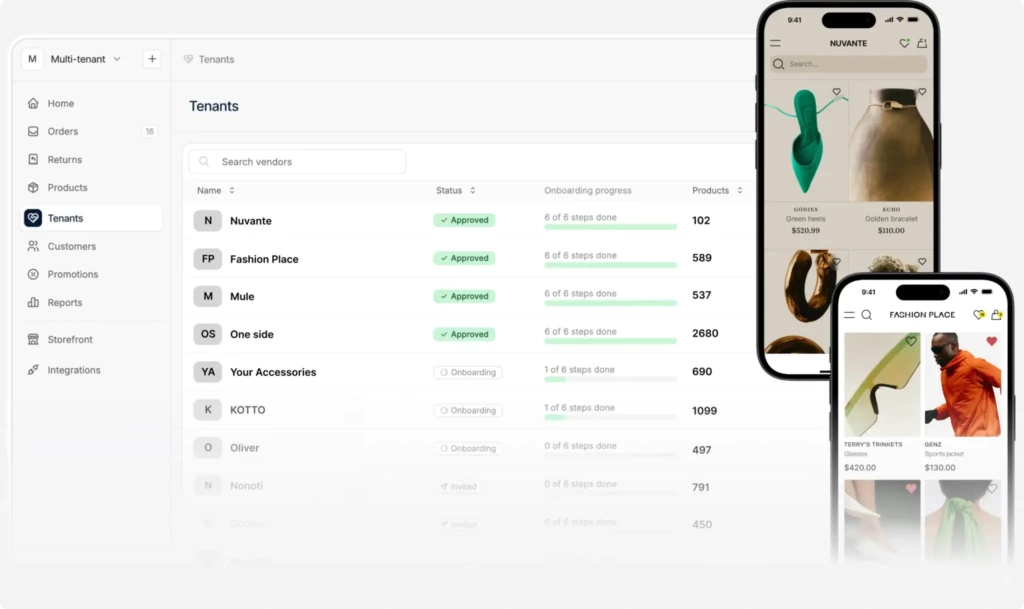
Multi-tenant white-label eCommerce is about running many independent online stores on a single platform. Each store (tenant) has its own products, customers, orders, branding and admin users, while the platform owner oversees all the tenant stores from a single superadmin dashboard.
This model is commonly used to build eCommerce Shopify-like SaaS platforms, support franchise or reseller network stores, or operate multiple brands or regional stores from one system.
Spree Commerce supports this approach by allowing you to host thousands of stores on a single eCommerce platform, either as a standalone SaaS product or as a headless service integrated with existing systems like authentication, ERP or CRM.
The result is one platform, shared infrastructure, and full operational separation between tenants—without duplicating code or infrastructure.
Multi‑Tenant Model: Key Questions

Can I decide how much autonomy tenants have over their stores?
Spree offers a “control spectrum” that ranges from centralized to decentralized management. You can choose to manage product catalogs, pricing and integrations at the platform level or give tenants full control. This flexibility is outlined in the Spree’s multi‑tenant eCommerce model documentation, which explains how to balance control and freedom.
Ways to configure tenant autonomy:
- Full centralization: The super‑admin controls products, pricing, shipping and taxes. Tenants simply run their stores using these settings.
- Hybrid control: Tenants can customize certain aspects—like promotions or shipping zones—while the platform owner retains control over core elements.
- Full autonomy: Tenants manage everything from product listings to payment providers, and the super‑admin focuses on infrastructure and billing.
What makes Spree scalable for hosting hundreds of stores?
Scalability in a multi‑tenant context means maintaining performance as you add stores. Spree’s modular architecture supports horizontal scaling and headless deployments. The admin multi‑tenant capabilities described in the documentation help you deploy multiple application servers, use backend queues for async jobs and integrate CDNs to keep your platform fast and responsive.
Scalability enablers in Spree:
- API‑first design: The backend and frontend can be separated. You can build custom frontends in React or Next.js, while the Spree API handles commerce logic.
- Horizontal scaling: Deploy multiple application servers behind a load balancer. This spreads traffic and ensures high availability.
- Caching and CDN integration: Use backend processing for data processing and multi-layered caching with an integrated content delivery network to improve response times.
How does Spree keep each tenant’s data separate yet manage everything centrally?
Spree uses a tenant‑scoping mechanism to ensure data isolation. Every request is tagged with a tenant identifier, so when a database query runs, it only returns data for that tenants. This protects against data leakage while letting the super‑admin oversee all stores through a single instance. The platform’s architecture delivers centralized management and isolated tenant environments, allowing you to run many stores securely on one infrastructure.
Highlights of Spree’s isolation and centralization:
- Tenant isolation: Data, orders and customers are scoped to each tenant, preventing cross‑tenant access.
- Centralized administration: A super‑admin dashboard lets you provision stores, enforce policies and manage shared services like payment gateways.
- Optional schema separation: For very large deployments, you can configure separate schemas or databases for each tenant to enhance performance and security.
How fast can I launch a multi‑tenant platform with Spree?
Spree’s Enterprise Edition includes private gems (libraries) with pre-built multi‑tenant functionality, drastically reducing development time. Many businesses launch within weeks. The short time to market is possible because tenant provisioning, catalog sharing and many other multi-tenant eCommerce capabilities are ready to use out-of-the-box.
Factors that speed up deployment:
- Ready‑made features: Tenant provisioning, tenant dashboards with drag & drop page builder, products and order management are built in.
- Extensive integrations: Out‑of‑the‑box support for popular payment gateways and marketing tools means less custom work.
- Developer productivity: Ruby on Rails and Spree’s modular approach make customization straightforward, enabling rapid iteration.
Multi‑Tenant Capabilities: What You Can Do
What catalog options does Spree support?
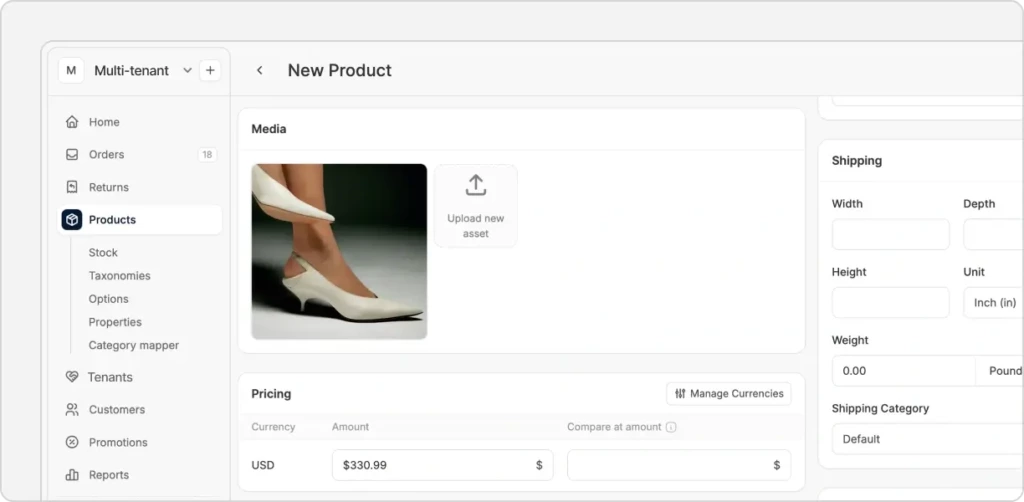
Product catalog strategies vary by business model. You can have a shared master catalog or let each tenant manage their own. Or you could allow for a hybrid catalog & inventory management strategy that combines master catalogs with tenant-specific catalogs.
Catalog flexibility options:
- Master catalog: Centralized product lists ensure uniformity across all tenants. The super‑admin controls products and pricing.
- Tenant-specific catalogs: Each tenant has a unique set of products and controls pricing independently.
- Hybrid model: Tenants can sell products from the master catalog and add their own items, providing a balance between uniformity and freedom.
How does tenant onboarding work—can I offer self‑service and invitations?
Yes. Spree provides both self‑service sign‑up flows and invitation‑only onboarding so you can tailor enrollment to your business. The tenant onboarding section of the capabilities docs describes how to implement self‑service sign‑ups and invitation approvals.
Onboarding methods:
- Self‑service: Prospective tenants sign-up, choose a plan and get an auto‑provisioned store. Useful for SaaS models with many small merchants onboarding in a self-service model.
- Invitation‑only: Super‑admins send invites after vetting applicants. Ideal for franchise networks or regulated industries.
- Hybrid: Allow sign‑ups but require manual approval before stores go live, blending convenience with quality control.
What white‑label tools does Spree offer?
White‑labeling is crucial for SaaS providers. Spree lets you and your tenants brand the admin and storefront so the underlying platform remains invisible. The branding & white‑label tools documentation details how to customize the admin UI, emails and storefront designs.
White‑label capabilities:
- Admin customization: Change logos, colors and styles in the dashboard to match your brand or allow tenants to set their own.
- Email templates: Customize order confirmations, shipping notices and marketing emails with tenant branding.
- Storefront theming: Tenants choose themes, adjust layouts and create landing pages without code.
Can Spree handle different billing models?
Spree enables you to customize the existing tenant onboarding with subscription plans, commissions and hybrids, helping you monetize the platform effectively.
Billing models:
- Subscriptions: Charge tenants a recurring fee – monthly, quarterly or annually. Offer multiple tiers with different feature sets.
- Commissions: Take a percentage of each sale. Common in marketplace scenarios.
- Hybrid: Combine a lower subscription fee with a commission on sales.
How do analytics work across all stores?
Spree provides global analytics for the platform owner and simplified individual analytics for each tenant. The global analytics & reporting, both built-in and using Google Analytics, allow you to see aggregated metrics across your networks.
Analytics overview:
- Global dashboard: Super‑admins monitor total revenue, orders and average order value across tenants.
- Tenant dashboards: Each tenant sees sales metrics, top products and customer segments for their store.
- External integrations: Connect with BI tools or services like Google Analytics for deeper insights.
Super‑Admin Capabilities: Managing the Platform

What can I control as a super‑admin?
As a super‑admin, you have full oversight. You provision stores, define global settings and manage shared integrations. The super‑admin capabilities documentation describes how to create and configure tenant stores and manage global settings.
Super‑admin powers:
- Store provisioning: Create, configure and delete tenant stores. Set domains, currencies and languages.
- Feature control: Enable or disable modules like promotions, gift cards or subscriptions.
- Shared services: Decide which payment gateways, shipping carriers and tax services are available to tenants.
How can I enforce platform‑wide policies?
With a little customization, Spree lets you set global policies—such as privacy practices, branding guidelines or product standards—and ensure tenants comply. This is part of the control spectrum described in the multi‑tenant model docs.
Policy enforcement options:
- Global content: Require tenants to display mandatory footer text, cookie notices or legal pages.
- Restricted features: Hide or lock certain admin panels so tenants cannot override critical settings.
- Default configurations: Provide standard shipping methods or payment options that tenants must use.
Can I decide between a master catalog and tenant catalogs?
Spree lets you choose whether to operate a shared master catalog, allow tenant-specific catalogs or adopt a hybrid approach. The master catalog options section explains how to configure these strategies.
Catalog control actions:
- Curate the master catalog: Add products, set prices and assign categories; tenants select from your offerings.
- Allow independent catalogs: Let tenants add and manage their own products.
- Mix and match: Provide core products centrally while enabling tenants to expand their assortment.
How does billing management work for the platform owner?
With some customization, tenant billing could be managed through the super‑admin portal or directly using billing solutions such as Stripe Billing. You define pricing plans, track payments and generate invoices. Details are found in the billing & subscription models documentation.
Billing administration tasks:
- Plan creation: Set up multiple subscription tiers with different features and prices.
- Invoicing and payments: Integrate with payment processors to automate billing cycles and handle failed payments.
- Commission tracking: Calculate commissions on tenant sales and collect fees automatically.
Where can I see cross‑tenant performance?
Spree’s analytics give you visibility across all stores so you can make informed decisions. The global analytics & reporting, which is a set of extensible reporting tools, provide aggregated metrics.
Cross‑tenant insights:
- Aggregated metrics: View total sales, order counts and average order values across tenants.
- Tenant comparisons: Identify high‑performing stores and those that need support.
- Revenue breakdowns: Separate subscription and commission income to understand your revenue streams.
Tenant Capabilities: Empowering Store Owners
What can tenants manage from their dashboard?
Tenants enjoy a comprehensive dashboard where they control products, customers, orders and marketing. The tenant dashboard documentation details these features.
Key dashboard features:
- Product management: Add, edit and categorize products; manage variants, prices and inventory.
- Order processing: View orders, update statuses, handle returns and generate packing slips.
- Customer management: Access customer profiles, segment buyers and track purchase history.
- Marketing tools: Create promotions, coupon codes and loyalty programs, and track their effectiveness.
How do tenants customize storefront designs?
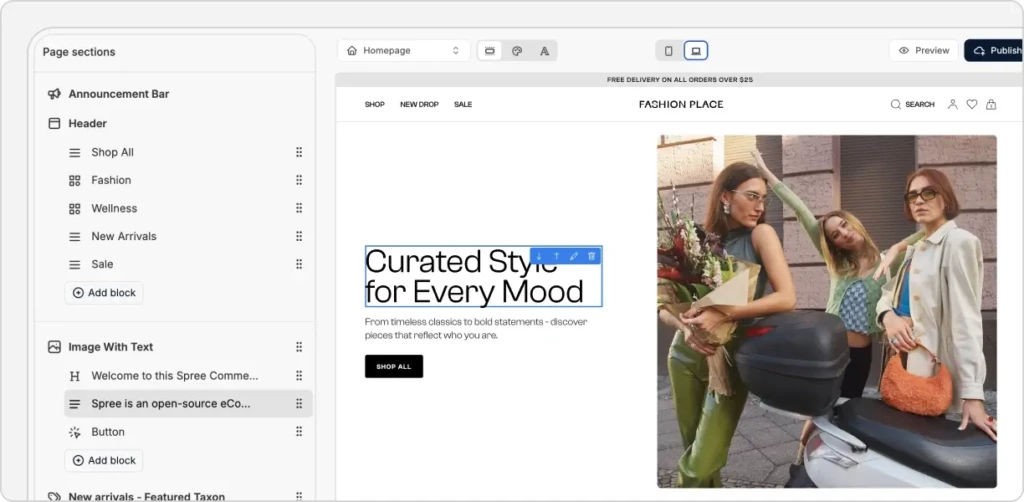
Without touching code, tenants can personalize their storefronts using themes and visual editors. The storefront theming capabilities let tenants choose themes and adjust layouts.
Storefront customization tools:
- Theme selection: Pick from pre‑built themes and personalize colors, fonts and layouts.
- Page builder: Drag and drop blocks to create landing pages, about pages and FAQs.
- Custom CSS: For those with design knowledge, add custom styles to refine the look and feel.
Can tenants control their shipping methods?
Yes. Tenants define shipping zones, set rates and choose carriers that fit their customers’ needs. The shipping configuration section covers these options.
Shipping configuration options:
- Zones and rates: Define regions and assign shipping prices based on weight, order total or flat fees.
- Carrier integration: Connect to UPS, FedEx or local couriers for real‑time quotes.
- Delivery options: Offer in‑store pickup, local delivery or scheduled delivery windows.
How do tenants set up payments and taxes?
Each tenant can integrate their preferred payment providers and configure tax rules. The payment & tax configuration docs explain how tenants connect gateways and set tax rates.
Payment and tax setup:
- Payment gateways: Use Stripe, PayPal, Adyen or other regional providers. Tenants enter their API keys to start accepting payments.
- Tax configuration: Define tax rates per region, set tax categories (e.g., goods vs. services) and integrate with tax automation services.
- Manual methods: Offer bank transfer or cash on delivery for markets where online payments are less common.
What marketing tools are available to tenants?
Spree helps tenants drive sales through promotions and loyalty programs. The promotions & discounts features support various marketing tactics.
Marketing capabilities:
- Discounts: Create percentage or fixed‑amount discounts, buy‑one‑get‑one offers and bundle pricing.
- Coupon codes: Generate unique codes for promotions and track redemptions.
- Loyalty programs: Implement point systems where customers earn rewards for purchases.
- Email templates: Customize transactional emails to reinforce branding and drive repeat business.
Can tenants manage their own legal content?
Compliance requirements vary, so Spree lets tenants control their legal pages. The policies & legal pages feature allows editing of privacy policies, terms & conditions and return policies.
Legal page management:
- Editable templates: Add and update privacy policies, terms & conditions and return policies.
- Localization: Translate pages into multiple languages to serve international audiences.
Multi‑Tenant Use Cases
How does Spree support franchises and reseller networks?
Franchises and reseller networks need centralized brand management with local flexibility. Spree lets the franchisor manage a master catalog and branding guidelines while franchisees or resellers operate their stores. They can modify product selections, run localized promotions and manage their customers, yet they must adhere to global brand rules. A super‑admin monitors performance across all outlets to ensure quality and compliance.
How do multi‑brand enterprises benefit from Spree?
Enterprises often run multiple brands targeting different audiences. Managing separate platforms can be expensive and inefficient. Spree lets enterprises host all brands on one platform, each with its own domain, design and catalog. Brands can share payment providers, logistics integrations and IT resources, reducing overhead. Meanwhile, data stays isolated, and teams have clearly defined access rights, ensuring that sensitive information isn’t shared across brands.
Why choose Spree for white‑label SaaS platforms?
White‑label eCommerce SaaS providers need to offer a robust, feature‑rich platform that clients can brand as their own. Spree’s multi‑tenant module delivers tenant provisioning, theming, billing and analytics out of the box. Clients can sign up, design their store, set prices and launch quickly. The platform owner manages infrastructure, security and updates, while clients run their businesses independently. The white‑label aspect hides Spree’s name from end users, making it look like a bespoke solution.
Enterprise Edition Overview and Closing Thoughts
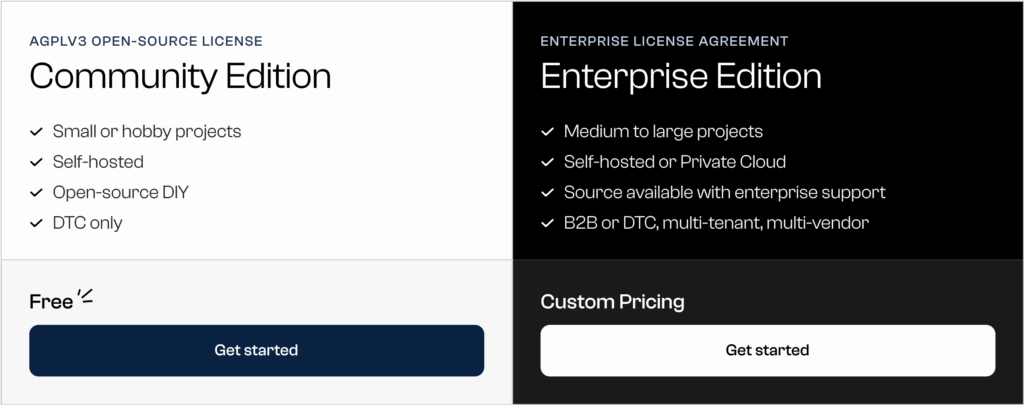
The multi‑tenant features described in this guide are part of the Spree Enterprise Edition. While the open‑source Community Edition is powerful for single‑store implementations, the Enterprise Edition provides the private gems, support and performance optimizations required for complex multi‑tenant deployments.
Enterprises benefit from priority support, enhanced security and exclusive modules for multi‑tenant, multi‑vendor and B2B scenarios. Licensing is offered on an annual basis, with costs scaling to the number of stores and support levels.
Spree Commerce empowers businesses to build scalable, secure and customizable multi‑tenant eCommerce platforms. By choosing Spree’s Enterprise Edition, you gain a robust foundation that balances centralized control with tenant autonomy, delivers flexible billing and branding, and supports diverse use cases—from franchises and reseller networks to multi‑brand enterprises and white‑label SaaS.