


Announcing Spree Commerce Sandboxes: Free Cloud Test Stores
Spree Commerce Sandboxes are free test stores in the cloud that anyone can start in seconds. You get your own store whether you write code or not. Click around the full admin dashboard or build against the Store and Admin APIs with sample data. There is no setup and no credit card required.

Key Takeaways
Last verified: July 2026
The win: Evaluate Spree Commerce in seconds with nothing to install.
What it does: A free test store starts in the cloud on its own web address the moment you sign up.
What you get: The full admin dashboard plus the Store and Admin APIs.
Spree Commerce capability: Spree Commerce provides free cloud sandboxes for developers and non-technical users alike.
What Is the Spree Commerce Sandbox?
A Spree Commerce Sandbox is your own free test store in the cloud, and anyone can have one: developers, eCommerce managers, founders, agencies. Sign up and your store is ready in seconds.
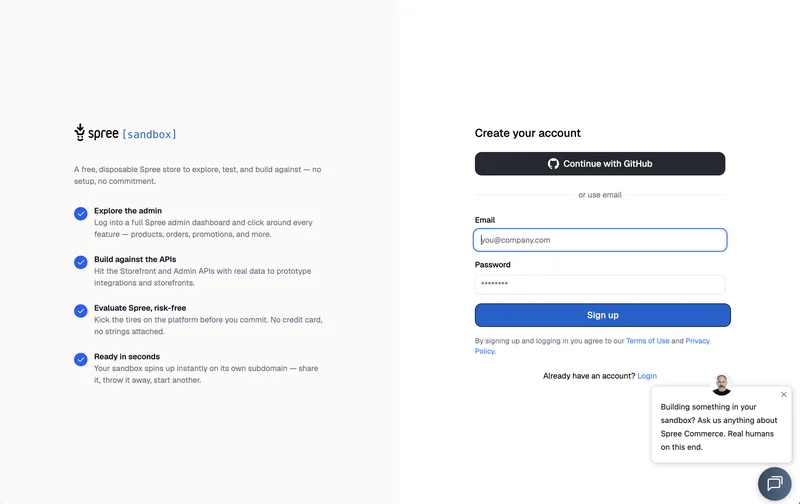
Here is what that gets you:
- Explore the admin dashboard. Log into a full Spree Commerce admin dashboard and click around every feature: products, orders, promotions, and more.
- Build against the APIs. Call the Store API and the Admin API with sample store data to prototype integrations and storefronts.
- Evaluate risk-free. Check the fit before investing more time in deeper evaluation and prototyping. No credit card and no strings attached.
- Ready in seconds. Your sandbox starts instantly on its own web address. Share it, throw it away, start another.
Every sandbox runs the latest Spree Commerce release, free and open source. You can run several sandboxes at once and delete them whenever you are done. One might hold a client demo while another holds an API experiment.
Who Are Spree Commerce Sandboxes For?
Anyone deciding whether Spree Commerce fits their project, whichever way they like to evaluate, and whoever they need to convince.
A Head of eCommerce comparing platforms wants to click through the admin dashboard. An agency wants to show a client a live store during a call. A founder wants to check whether the promotions engine fits their pricing model. A developer wants to call a live API before setting anything up on their own machine.
The sandbox serves all of them: sign up, click around, decide.
Evaluation is rarely a solo job, and sandboxes are made for sharing. Invite your team into the admin dashboard and everyone evaluates the same store: the developer checks the APIs while the operations lead clicks through products and promotions. When the evaluation goes deeper, start another sandbox for prototyping and keep the first one for stakeholder demos. Nobody waits for anybody to provision anything.
What Can You Explore in a Sandbox?
Everything the platform does day to day, with sample store data already in place.
The sandbox is a complete store, not a stripped demo.
| You want to… | In the sandbox |
|---|---|
| See how the admin dashboard works | Full dashboard: products, orders, promotions, and more |
| Prototype a storefront or integration | Call the APIs with sample data |
| Launch a test storefront | One-click deploy from the Getting Started checklist |
| Show a stakeholder a live store | Invite them into the admin dashboard |
| Test an idea without consequences | Delete the sandbox and start another |
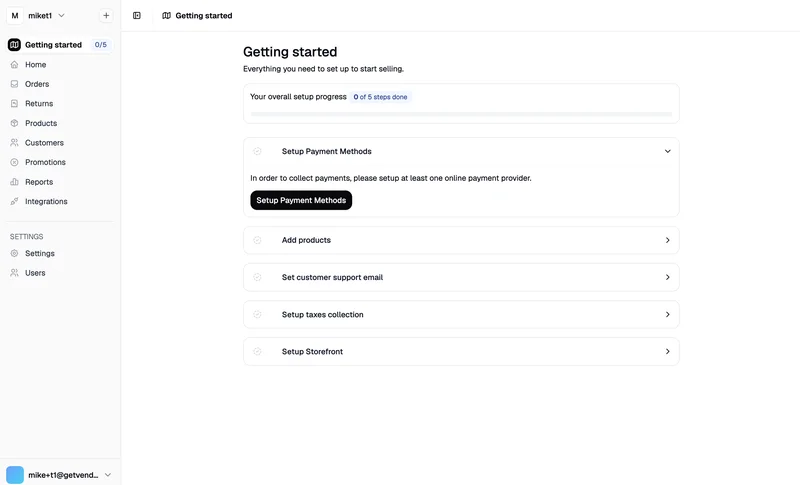
The admin dashboard greets you with a Getting Started checklist that mirrors a real store setup: payment methods, products, a customer support email, taxes, and a storefront. Working through it is the evaluation.
Two parts matter most for technical evaluations. The Store API powers customer-facing surfaces such as websites and mobile apps. The Admin API covers the business behind them: catalog, orders, customers, and settings. Both APIs are live in every sandbox, so you can prototype against working endpoints from minute one.
You can also work the Admin API from the Spree Commerce CLI, straight from your terminal. Here is how to connect the CLI to your sandbox’s Admin API.
Spree Commerce is a headless eCommerce platform, which means the sandbox backend can feed any frontend you want to test: a web storefront, a mobile app, or a script on your laptop.
Connect a Test Storefront to Your Sandbox
Your sandbox can power a real storefront, not just the admin dashboard. Any web storefront or mobile app connects to it through the Store API, the same way it would connect to a production store. The sandbox turns this into a guided step: Setup Storefront sits right in the Getting Started checklist, with everything you need on one screen.
The one-click path does the work for you. The Deploy button takes the open source Next.js eCommerce storefront, clones it to your Git account, and builds it on Vercel with your sandbox credentials prefilled. When the deployment finishes, you paste the storefront’s web address back into the setup screen, and it becomes the base for links in customer emails from your test store.
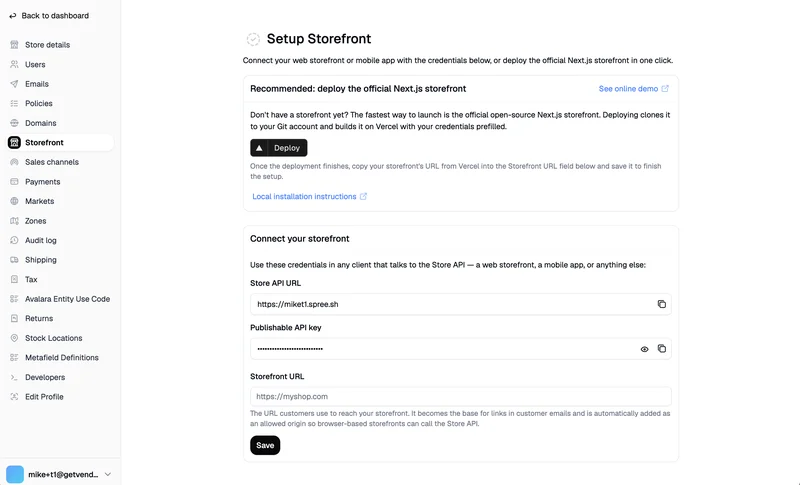
Prefer to run the storefront on your own machine? The same screen shows the two credentials any Store API client needs: your sandbox’s Store API web address and a publishable API key, each with a copy button. The Next.js eCommerce storefront quickstart walks through the local setup with those two values.
From there the loop closes. Products you edit in the sandbox admin dashboard appear in the storefront. Test orders placed in the storefront show up in the sandbox. You watch the full headless setup your future production store would run, end to end, with sample data flowing between the pieces.
A Live Store for Your AI Coding Agent
A sandbox is also the fastest way to give a coding agent something real to build against. The Stack Overflow 2025 Developer Survey found that 84% of developers use or plan to use AI tools in their work. The same survey named their biggest frustration, cited by 66% of respondents: “AI solutions that are almost right, but not quite.”
Almost-right code comes from agents that guess instead of verify.
A sandbox removes the guessing. Point Claude Code, Cursor, or Copilot at your sandbox’s APIs and the agent works against a live test store, not a mock. Create a scoped key in the sandbox admin, and the agent can read exactly what you allow. Pair it with the installable agent skills for Spree Commerce, and your agent learns the platform’s conventions before it writes a line of code.
The agentic development overview shows the full toolbox. The sandbox gives it a place to run.
What Are the Ground Rules?
Sandboxes are for evaluation and testing, and the limits follow from that. Payment gateways run in test mode only, so no real payments are processed. You work with test data, which keeps your evaluation quick and consequence-free. Every sandbox also lives on its own web address, so what you try in one never touches another.
A sandbox is also not a production host.
When you are ready to launch a live business, you take the same open source eCommerce platform and run it on infrastructure you own. Your sandbox is the tryout; the platform you validated is what goes live, fully under your control.
Sandboxes are disposable by design. Share one with your team, wipe it, or run several side by side. There is nothing to cancel and nothing to uninstall. The same limits make sandboxes safe for demos and training, since there are no real cards and no real customer records to put at risk.
From Sandbox to Production
The path out of the sandbox is the same open source platform, running wherever you choose. Nothing you validated gets thrown away.
When you are ready to go deeper, the one-command local install puts the same platform on your machine, and self-hosting the free Community Edition takes the exact store you evaluated to production. Teams pair the backend with a Next.js storefront the way Maisonette runs its marketplace, serving 65,000+ products through a headless frontend. Your sandbox findings, from admin workflows to API prototypes, carry straight over.
Whichever path fits, the store you tested is the store you launch. A sandbox is the same platform, not a simplified copy, so your evaluation maps one to one to production.
For mission-critical operations, the Enterprise Edition adds first-party modules for B2B eCommerce, multi-tenant eCommerce, and multi-vendor marketplace automations, plus SLA-backed support from the team that builds the platform. If your roadmap includes wholesale ordering, hundreds of storefronts, or a marketplace at scale, talk to the team about the Enterprise Edition.
Get Started With the Spree Commerce Sandbox
The fastest way to form an opinion about Spree Commerce is to use a live store, and a sandbox gives you one in seconds. Create your free sandbox and click around the admin the way your team would use it: add a product, build a promotion, place a test order.
Developers can go deeper the same day. Browse the Store API reference, point a coding agent at the sandbox, or run the platform locally with the installation quickstart when you want the code on your own machine. Your account can hold several sandboxes at once, so there is no cost to trying an idea twice or demoing one store per client.
However you evaluate, the next step is simple. Keep the sandbox around for experiments and launch the very same open source platform in production whenever you are ready to sell. For enterprise requirements, wholesale ordering, or marketplace projects, get in touch with the team.
Frequently Asked Questions
How can you try Spree Commerce without installing it?
Sign up at spree.sh and a cloud test store starts on its own web address in seconds. You get the full admin dashboard plus the Store and Admin APIs with sample data, so evaluation begins right away. Spree Commerce provides a free hosted sandbox at spree.sh that creates a test store in seconds.
What is an eCommerce sandbox?
An eCommerce sandbox is a temporary online store used to evaluate a platform, test integrations, or train a team without touching production systems. It behaves like a real store but runs on test data. Spree Commerce offers a cloud sandbox with a full admin dashboard, a Store API, and an Admin API.
Can you test an eCommerce API without building a store first?
Yes. A hosted sandbox gives you live API endpoints with sample store data the moment you sign up, so integration prototypes start immediately. Spree Commerce includes the Store API for storefronts and the Admin API for backend operations, and both APIs are callable from every sandbox.
Can customers make real purchases in a sandbox store?
No. Sandbox stores exist for evaluation, so checkout flows work end to end but money never moves. This makes them safe for demos, training, and integration tests. Spree Commerce provides sandbox stores with payment gateways restricted to test mode, so no real payments are processed.
Is there a free way to evaluate an open source eCommerce platform?
Yes. Open source platforms can be installed locally for free, and hosted sandboxes remove even that setup step. You evaluate the real product rather than a sales demo. Spree Commerce provides both a free hosted sandbox and free open source code for self-hosted production stores.
Can you use a sandbox store in production?
No. Sandboxes are disposable, run on test data, and process no real payments, so they are unsuitable for live selling. Launching for real means deploying the platform on infrastructure you control. Spree Commerce supports evaluation in disposable sandboxes and production on infrastructure you own and control.