> ## Documentation Index
> Fetch the complete documentation index at: https://spreecommerce.org/docs/llms.txt
> Use this file to discover all available pages before exploring further.
# Product Metafields
> Learn how to use product metafields in Spree Commerce to enrich your product data.
Product Metafields allow you to add custom attributes to products beyond the default fields included in Spree. Whether you want to display additional product specifications on the storefront, store internal merchandising notes, or support advanced integrations, metafields give you complete flexibility directly from the admin dashboard.
Unlike legacy product properties, metafields are structured, scalable, and work seamlessly with imports, APIs, and storefront display settings.
## Why Use Product Metafields?
Product metafields are ideal when you need to:
* Add **technical specifications** (e.g., voltage, dimensions, fabric composition)
* Display **care instructions**
* Highlight **sustainability certifications**
* Store **supplier or internal notes**
* Add **regulatory information**
* Include **SEO enhancements**
* Attach **structured product data**
* Power custom storefront sections
* Support third-party integrations
Because metafields can be created and managed entirely from the dashboard, they reduce development time and eliminate the need for database changes or code deployments.
## How to Create a Product Metafield
To create a new product metafield, navigate to **Settings → Metafield Definitions**.
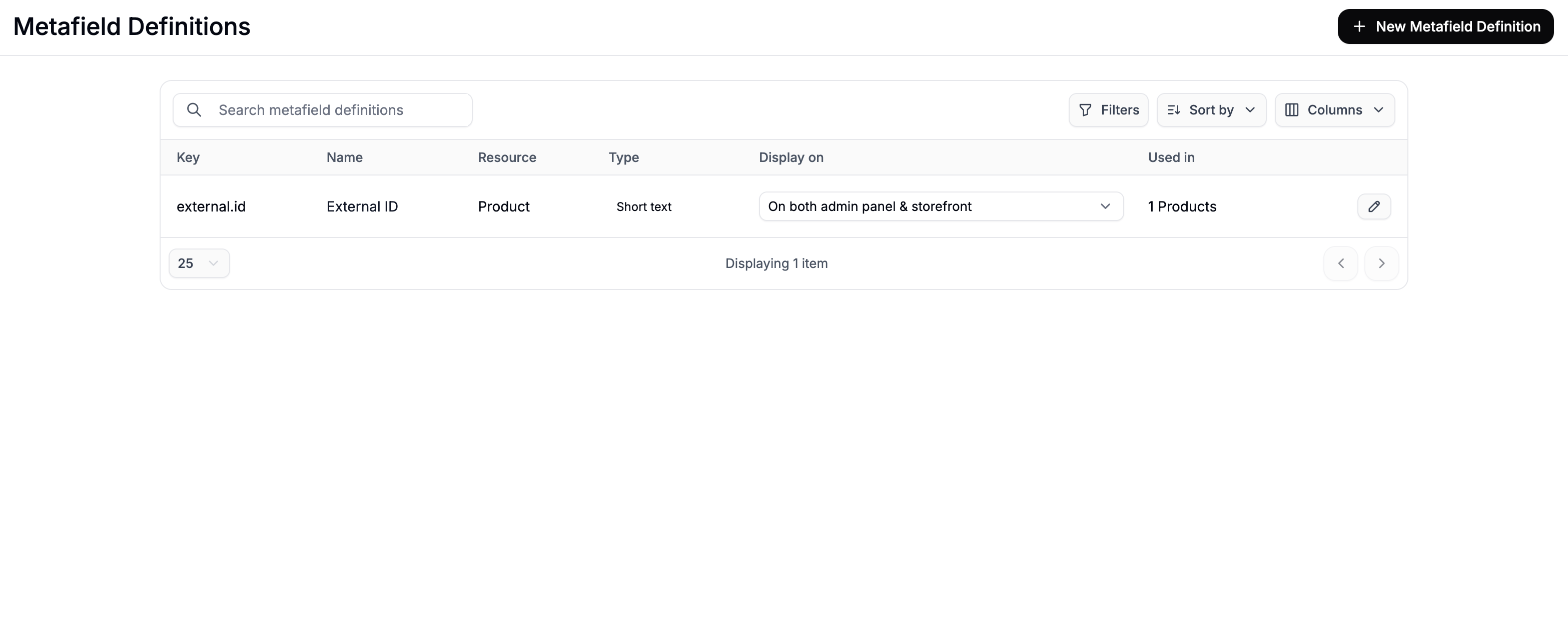 Click **New Metafield Definition** to open the metafield creation form.
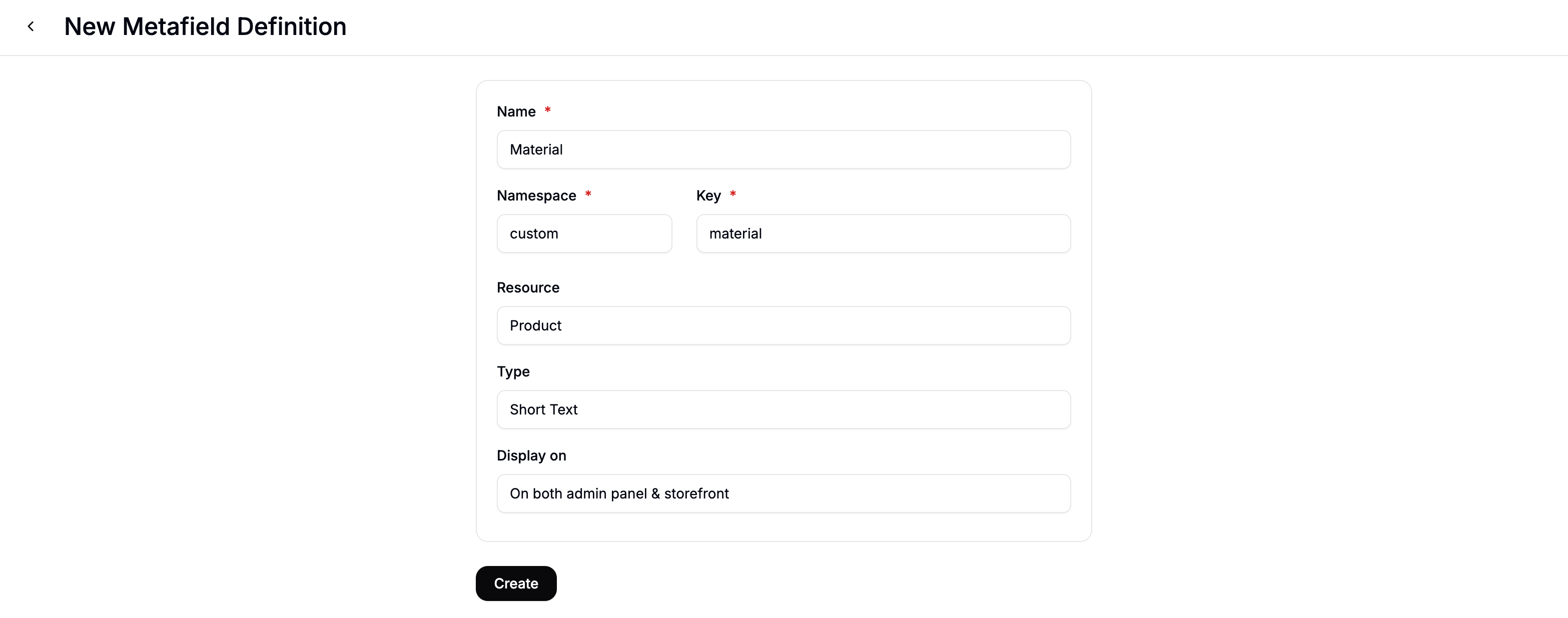 Complete the form fields as described below.
## **Metafield Definition Fields**
### **Name**
The display name shown in the admin panel and (optionally) on the storefront.\
Example:
* Material
* Care Instructions
* Sustainability Rating
### **Namespace**
Used to group metafields and avoid naming conflicts.
* We recommend using something like **custom** for merchant-defined product fields.
* Avoid using reserved model names like **product**, **variant**, or **order**.
### **Key**
The unique identifier for the metafield (combined with the namespace).
Example:
* **custom.material**
* **custom.care\_instructions**
* **custom.sustainability\_score**
### **Resource**
For product metafields, select **Product**.
To learn more about creating metafields for other resources, see [Metafields](https://spreecommerce.org/docs/user/settings/metafields).
## **Choosing the Right Data Type**
Each metafield must have a type. Selecting the appropriate type ensures your data is structured correctly.
### **Short Text**
Single-line text values.
Examples:
* “Denim”
* “Made in Italy”
* “BPA Free”
### **Long Text**
Multi-line text without formatting.
Examples:
* Care instructions
* Ingredient lists
* Warranty information
### **Rich Text**
Formatted content with styling options.
Examples:
* Marketing descriptions
* Detailed sustainability breakdowns
* Compliance disclaimers
### **Number**
Numeric values.
Examples:
* 4.8 (average rating)
* 32 (waist size)
* 750 (capacity in ml)
### **Boolean**
True/false values.
Examples:
* Is this product eco-friendly?
* Is this item fragile?
* Limited edition?
### **JSON**
Structured data or multiple related values.
Examples:
* Technical specifications object
* Nutritional breakdown
* Multi-attribute certification data
## Display Settings
Choose where the metafield should appear:
* **Admin Only** - Internal use (e.g., supplier notes, internal margin classification)
* **Admin & Storefront** - Visible to customers on product pages
If displayed on the storefront, metafields can be used within your theme to enhance the Product Detail Page (PDP).
## Adding Product Metafield Values
Once the definition is created, you can assign values to individual products.
### Adding Values Individually
Complete the form fields as described below.
## **Metafield Definition Fields**
### **Name**
The display name shown in the admin panel and (optionally) on the storefront.\
Example:
* Material
* Care Instructions
* Sustainability Rating
### **Namespace**
Used to group metafields and avoid naming conflicts.
* We recommend using something like **custom** for merchant-defined product fields.
* Avoid using reserved model names like **product**, **variant**, or **order**.
### **Key**
The unique identifier for the metafield (combined with the namespace).
Example:
* **custom.material**
* **custom.care\_instructions**
* **custom.sustainability\_score**
### **Resource**
For product metafields, select **Product**.
To learn more about creating metafields for other resources, see [Metafields](https://spreecommerce.org/docs/user/settings/metafields).
## **Choosing the Right Data Type**
Each metafield must have a type. Selecting the appropriate type ensures your data is structured correctly.
### **Short Text**
Single-line text values.
Examples:
* “Denim”
* “Made in Italy”
* “BPA Free”
### **Long Text**
Multi-line text without formatting.
Examples:
* Care instructions
* Ingredient lists
* Warranty information
### **Rich Text**
Formatted content with styling options.
Examples:
* Marketing descriptions
* Detailed sustainability breakdowns
* Compliance disclaimers
### **Number**
Numeric values.
Examples:
* 4.8 (average rating)
* 32 (waist size)
* 750 (capacity in ml)
### **Boolean**
True/false values.
Examples:
* Is this product eco-friendly?
* Is this item fragile?
* Limited edition?
### **JSON**
Structured data or multiple related values.
Examples:
* Technical specifications object
* Nutritional breakdown
* Multi-attribute certification data
## Display Settings
Choose where the metafield should appear:
* **Admin Only** - Internal use (e.g., supplier notes, internal margin classification)
* **Admin & Storefront** - Visible to customers on product pages
If displayed on the storefront, metafields can be used within your theme to enhance the Product Detail Page (PDP).
## Adding Product Metafield Values
Once the definition is created, you can assign values to individual products.
### Adding Values Individually
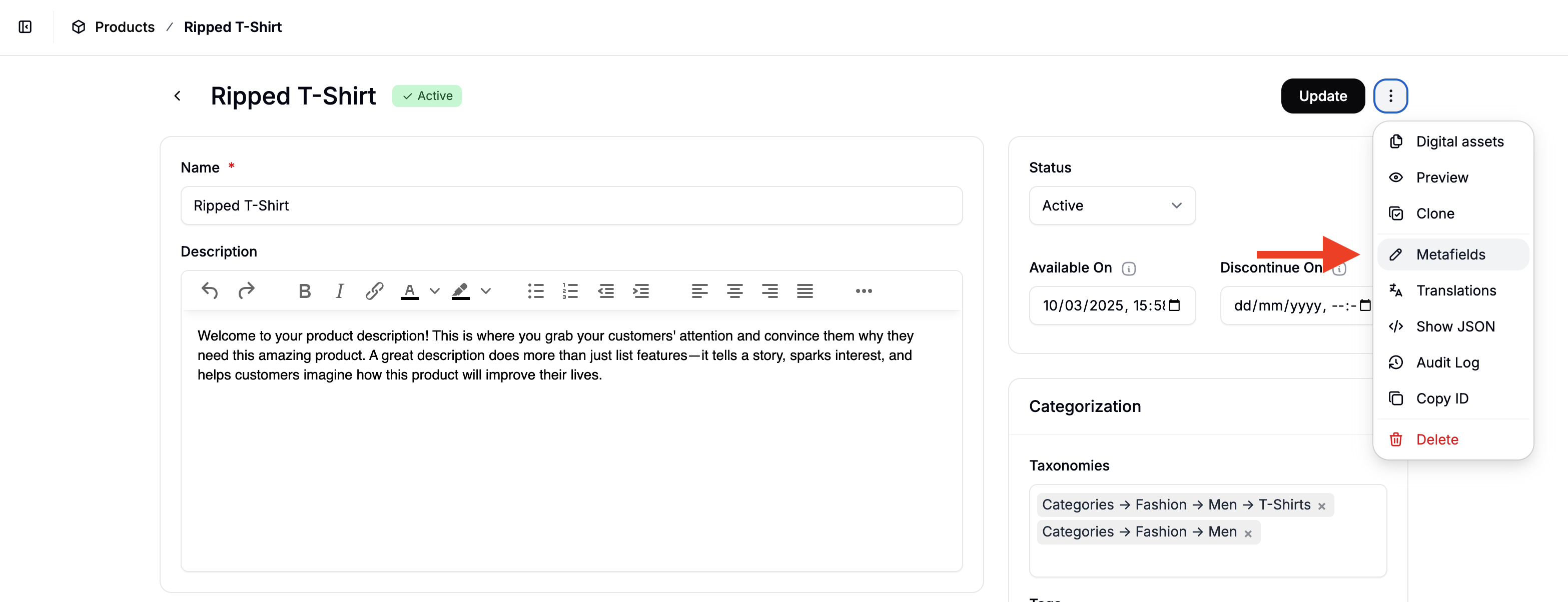 To add metafield values for individual products:
1. Navigate to **Products**
2. Open the product you want to update
3. Click the **three-dot menu** in the top-right corner
4. Select **Metafields** to open the metafields form
5. Enter the desired values
6. Click **Save**
This method is ideal for updating a small number of products.
### Updating Product Metafields in Bulk
You can also import metafields via CSV.
#### Step 1: Add a Column to the product CSV file
Use this format:
**metafield.namespace.key**
Example:
* **metafield.custom.material**
* **metafield.custom.care\_instructions**
* **metafield.custom.sustainability\_score**
#### Step 2: Add Values Per Product Row
Fill in the values for each product.
#### Step 3: Import the File
* Upload during a new product import **or**
* Export your existing catalog, update it, and reimport with the newly added columns to apply changes
This is especially useful when enriching large product catalogs.
Please refer to the following support articles for more information about product imports:
* [Import Product](https://spreecommerce.org/docs/user/manage-products/import-products)
* [Product Import Template](https://spreecommerce.org/docs/user/manage-products/product-import-file-template)
## Real-World Product Metafield Examples
Here are some practical examples of how merchants use product metafields:
### Apparel
* Material: “100% Organic Cotton”
* Care Instructions: “Machine wash cold, tumble dry low”
* Fit Type: “Slim Fit”
* Fabric Weight (gsm): 180
### Electronics
* Battery Life: 12 (hours)
* Warranty Period: 24 (months)
* Waterproof: true
* Voltage: 110–240V
### Food & Supplements
* Allergens: “Contains nuts”
* Ingredients: Long text field
* Nutritional Info: JSON structure
* Expiration Period: 18 (months)
### Furniture
* Assembly Required: true
* Weight Capacity: 250 (lbs)
* Material Finish: “Matte Walnut”
* Care Instructions: Rich text
### B2B Use Cases
* Internal Margin Tier (Admin Only)
* Supplier SKU
* Minimum Order Quantity
* Packaging Type
* Compliance Classification
## Replacing Product Properties
Product Properties are no longer supported in the latest version of Spree. Product Metafields provide a more flexible, scalable, and structured solution for managing custom product attributes.
If you previously relied on properties for product enrichment, metafields are now the recommended approach.
Product metafields give you the flexibility to tailor your product data model to your business - without relying on developers - while keeping your catalog structured, scalable, and integration-ready.
To add metafield values for individual products:
1. Navigate to **Products**
2. Open the product you want to update
3. Click the **three-dot menu** in the top-right corner
4. Select **Metafields** to open the metafields form
5. Enter the desired values
6. Click **Save**
This method is ideal for updating a small number of products.
### Updating Product Metafields in Bulk
You can also import metafields via CSV.
#### Step 1: Add a Column to the product CSV file
Use this format:
**metafield.namespace.key**
Example:
* **metafield.custom.material**
* **metafield.custom.care\_instructions**
* **metafield.custom.sustainability\_score**
#### Step 2: Add Values Per Product Row
Fill in the values for each product.
#### Step 3: Import the File
* Upload during a new product import **or**
* Export your existing catalog, update it, and reimport with the newly added columns to apply changes
This is especially useful when enriching large product catalogs.
Please refer to the following support articles for more information about product imports:
* [Import Product](https://spreecommerce.org/docs/user/manage-products/import-products)
* [Product Import Template](https://spreecommerce.org/docs/user/manage-products/product-import-file-template)
## Real-World Product Metafield Examples
Here are some practical examples of how merchants use product metafields:
### Apparel
* Material: “100% Organic Cotton”
* Care Instructions: “Machine wash cold, tumble dry low”
* Fit Type: “Slim Fit”
* Fabric Weight (gsm): 180
### Electronics
* Battery Life: 12 (hours)
* Warranty Period: 24 (months)
* Waterproof: true
* Voltage: 110–240V
### Food & Supplements
* Allergens: “Contains nuts”
* Ingredients: Long text field
* Nutritional Info: JSON structure
* Expiration Period: 18 (months)
### Furniture
* Assembly Required: true
* Weight Capacity: 250 (lbs)
* Material Finish: “Matte Walnut”
* Care Instructions: Rich text
### B2B Use Cases
* Internal Margin Tier (Admin Only)
* Supplier SKU
* Minimum Order Quantity
* Packaging Type
* Compliance Classification
## Replacing Product Properties
Product Properties are no longer supported in the latest version of Spree. Product Metafields provide a more flexible, scalable, and structured solution for managing custom product attributes.
If you previously relied on properties for product enrichment, metafields are now the recommended approach.
Product metafields give you the flexibility to tailor your product data model to your business - without relying on developers - while keeping your catalog structured, scalable, and integration-ready.