> ## Documentation Index
> Fetch the complete documentation index at: https://spreecommerce.org/docs/llms.txt
> Use this file to discover all available pages before exploring further.
# Tenant Capabilities
> Learn how tenants can manage their stores in Spree Enterprise Edition.
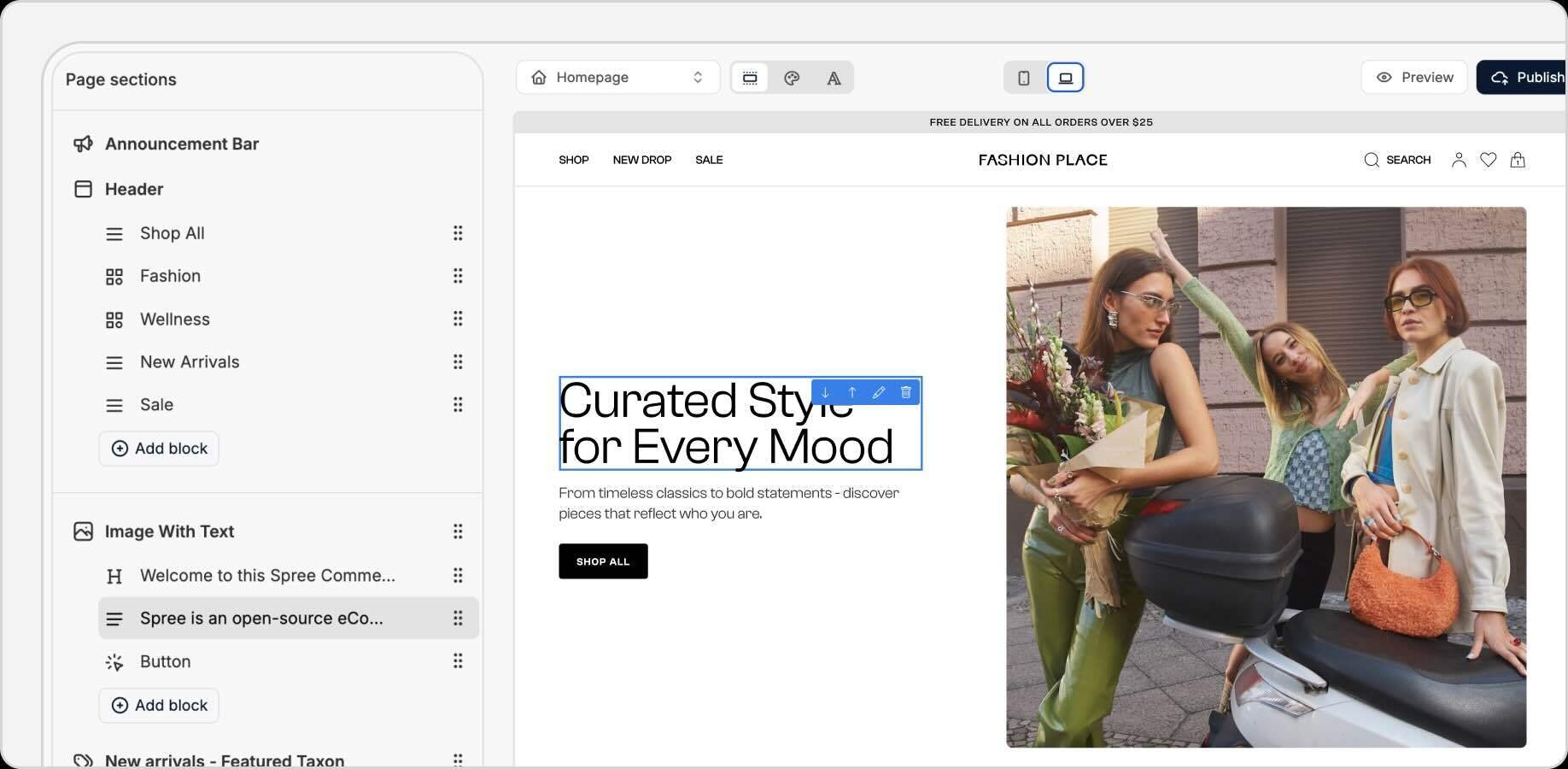 Spree Commerce Enterprise Edition provides tenants with a robust set of tools to manage every aspect of their stores. From catalog management and order fulfillment to branding and analytics, tenants enjoy full control over their ecommerce operations - subject to super admin policies and platform configurations.
## Tenant Dashboard
Tenants interact with an intuitive dashboard designed for day-to-day operations:
* **Products** – Add, edit, and categorize products, manage inventory, upload images, and define product attributes.
* **Orders** – View, process, and update orders with real-time status tracking.
* **Customers** – Manage customer accounts, view histories, and offer loyalty programs (if enabled).
* **Analytics** – Access sales, traffic, and performance reports scoped to their store.
* **Settings** – Configure store profile, policies, and operational preferences.
## Storefront Theming & Branding
Tenants can create unique storefronts that reflect their brand identity:
* **Theme Editor** – Customize layouts with drag-and-drop modules.
* **Brand Assets** – Upload logos, banners, and product imagery.
* **Color & Typography Settings** – Adjust styling to align with brand guidelines.
* **Localized Content** – Manage language and currency options for a global customer base.
* **Custom Domains** – Assign tenant-specific URLs (subject to super admin configuration).
## Catalog & Inventory Management
Full-featured tools to manage a tenant’s product offerings:
* **Product Catalog** – Build and maintain independent catalogs or pull from a shared master catalog (if enabled).
* **Inventory Management** – Track stock levels, set backorder policies, and manage SKUs.
* **Collections & Tags** – Organize products into categories, collections, and tag groups.
* **Product Properties** – Define reusable attributes like material, size, or allergens.
## Payment, Tax, & Shipping Configuration
Tenants can tailor operational workflows:
* **Payment Gateways** – Configure own payment processors or use platform-provided options.
* **Tax Settings** – Set tax rules per region, integrate with tax APIs (subject to super admin settings).
* **Shipping Rules** – Define zones, carriers, and rates, or leverage centralized fulfillment services.
## Promotions & Marketing
Drive customer engagement with robust marketing tools:
* **Discounts & Coupons** – Create and manage promo campaigns.
* **Gift Cards** – Issue and redeem digital gift cards.
* **Email Marketing** – Integrate with email automation tools for abandoned cart recovery, upsells, and newsletters.
* **SEO Tools** – Optimize meta tags, sitemaps, and URLs for search visibility.
## Customer Service & Policies
Empower tenants to manage their own customers and store policies:
* **Helpdesk Tools** – Optional chatbots or live chat integrations.
* **Policies** – Configure privacy policies, T\&Cs, and returns/refunds guidelines.
* **Customer Credits** – Issue store credits for returns or loyalty programs.
## Analytics & Reporting
Data-driven insights to monitor and grow their businesses:
* **Sales Dashboards** – Track revenue, AOV, conversion rates, and top-selling products.
* **Google Analytics Integration** – Connect their store for detailed customer insights.
* **Export Tools** – Download product and order data for offline analysis.
## Integrations & Extensions
Tenants can access a library of pre-configured integrations and features provided by the super admin:
* **Built-In Integrations** – Tools like Stripe, PayPal, Google Analytics, and Klaviyo are available out of the box.
* **Custom Extensions** – Additional marketing, payment, or operational tools made available by the platform owner.
Schedule a demo to explore the platform and get your questions answered
See Enterprise pricing for your use case
## Further Reading
* [Multi-Tenant Model](https://spreecommerce.org/docs/use-case/multi-tenant/multi-tenant-model)
* [Multi-Tenant Capabilities](https://spreecommerce.org/docs/use-case/multi-tenant/multi-tenant-capabilities)
* [Super Admin Capabilities](https://spreecommerce.org/docs/use-case/multi-tenant/super-admin-capabilities)
* [Franchises & Reseller Networks](https://spreecommerce.org/docs/use-case/multi-tenant/franchises-and-reseller-networks)
* [Multi-Brand Enterprises](https://spreecommerce.org/docs/use-case/multi-tenant/multi-brand-enterprise-model)
* [White-Label SaaS](https://spreecommerce.org/docs/use-case/multi-tenant/white-label-saas)
Spree Commerce Enterprise Edition provides tenants with a robust set of tools to manage every aspect of their stores. From catalog management and order fulfillment to branding and analytics, tenants enjoy full control over their ecommerce operations - subject to super admin policies and platform configurations.
## Tenant Dashboard
Tenants interact with an intuitive dashboard designed for day-to-day operations:
* **Products** – Add, edit, and categorize products, manage inventory, upload images, and define product attributes.
* **Orders** – View, process, and update orders with real-time status tracking.
* **Customers** – Manage customer accounts, view histories, and offer loyalty programs (if enabled).
* **Analytics** – Access sales, traffic, and performance reports scoped to their store.
* **Settings** – Configure store profile, policies, and operational preferences.
## Storefront Theming & Branding
Tenants can create unique storefronts that reflect their brand identity:
* **Theme Editor** – Customize layouts with drag-and-drop modules.
* **Brand Assets** – Upload logos, banners, and product imagery.
* **Color & Typography Settings** – Adjust styling to align with brand guidelines.
* **Localized Content** – Manage language and currency options for a global customer base.
* **Custom Domains** – Assign tenant-specific URLs (subject to super admin configuration).
## Catalog & Inventory Management
Full-featured tools to manage a tenant’s product offerings:
* **Product Catalog** – Build and maintain independent catalogs or pull from a shared master catalog (if enabled).
* **Inventory Management** – Track stock levels, set backorder policies, and manage SKUs.
* **Collections & Tags** – Organize products into categories, collections, and tag groups.
* **Product Properties** – Define reusable attributes like material, size, or allergens.
## Payment, Tax, & Shipping Configuration
Tenants can tailor operational workflows:
* **Payment Gateways** – Configure own payment processors or use platform-provided options.
* **Tax Settings** – Set tax rules per region, integrate with tax APIs (subject to super admin settings).
* **Shipping Rules** – Define zones, carriers, and rates, or leverage centralized fulfillment services.
## Promotions & Marketing
Drive customer engagement with robust marketing tools:
* **Discounts & Coupons** – Create and manage promo campaigns.
* **Gift Cards** – Issue and redeem digital gift cards.
* **Email Marketing** – Integrate with email automation tools for abandoned cart recovery, upsells, and newsletters.
* **SEO Tools** – Optimize meta tags, sitemaps, and URLs for search visibility.
## Customer Service & Policies
Empower tenants to manage their own customers and store policies:
* **Helpdesk Tools** – Optional chatbots or live chat integrations.
* **Policies** – Configure privacy policies, T\&Cs, and returns/refunds guidelines.
* **Customer Credits** – Issue store credits for returns or loyalty programs.
## Analytics & Reporting
Data-driven insights to monitor and grow their businesses:
* **Sales Dashboards** – Track revenue, AOV, conversion rates, and top-selling products.
* **Google Analytics Integration** – Connect their store for detailed customer insights.
* **Export Tools** – Download product and order data for offline analysis.
## Integrations & Extensions
Tenants can access a library of pre-configured integrations and features provided by the super admin:
* **Built-In Integrations** – Tools like Stripe, PayPal, Google Analytics, and Klaviyo are available out of the box.
* **Custom Extensions** – Additional marketing, payment, or operational tools made available by the platform owner.
Schedule a demo to explore the platform and get your questions answered
See Enterprise pricing for your use case
## Further Reading
* [Multi-Tenant Model](https://spreecommerce.org/docs/use-case/multi-tenant/multi-tenant-model)
* [Multi-Tenant Capabilities](https://spreecommerce.org/docs/use-case/multi-tenant/multi-tenant-capabilities)
* [Super Admin Capabilities](https://spreecommerce.org/docs/use-case/multi-tenant/super-admin-capabilities)
* [Franchises & Reseller Networks](https://spreecommerce.org/docs/use-case/multi-tenant/franchises-and-reseller-networks)
* [Multi-Brand Enterprises](https://spreecommerce.org/docs/use-case/multi-tenant/multi-brand-enterprise-model)
* [White-Label SaaS](https://spreecommerce.org/docs/use-case/multi-tenant/white-label-saas)