> ## Documentation Index
> Fetch the complete documentation index at: https://spreecommerce.org/docs/llms.txt
> Use this file to discover all available pages before exploring further.
# Marketplace Vendor Panel
> Learn about the Spree multi-vendor marketplace vendor UX.
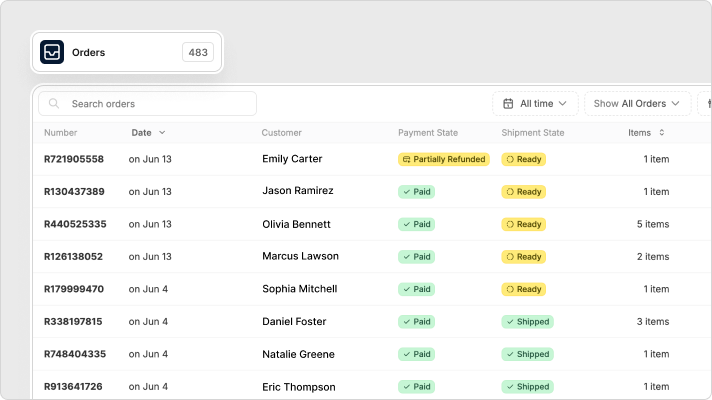 Spree Commerce Enterprise Edition offers vendors a streamlined and intuitive dashboard designed specifically for [multi-vendor marketplace](https://spreecommerce.org/marketplace-ecommerce/) operations.
Schedule a demo to explore the platform and get your questions answered
See Enterprise pricing for your use case
With automated integrations with popular platforms like Shopify and WooCommerce, Spree empowers vendors to effortlessly manage their marketplace offerings, improve sales performance, and deliver exceptional customer service, all within a user-friendly and familiar environment of their own dashboard.
### Vendor Dashboard UX
1. **Products**: Upload and manage inventory, categories, and pricing.
2. **Orders**: Process new orders, add shipment tracking, view status.
3. **Analytics**: Review sales, refunds, and fulfillment metrics.
4. **Settings**: Configure shipping methods, policies, billing info.
### Vendor Onboarding Options
* **Shopify**: Sales channel app that syncs products, orders, and shipments.
* **WooCommerce**: Direct API integratio that sync products, orders, and shipments.
* **Manual or CSV Import**: For vendors not using ecommerce platforms.
### Vendor Profile & Settings
* **Shipping Setup**: Define rates and methods per location.
* **Multi-Language & Currency Support**: Vendors can localize their store presence.
* **Holiday Mode**: Pause shop temporarily.
### Shopify Vendor Operations
* **Product Sync**: Vendors manage inventory in Shopify; marketplace reflects changes.
* **Order Handling**: Orders appear in Shopify admin for normal fulfillment.
* **Fulfillment & Shipment Sync**: Auto-updates customer notifications.
* **Cancellation & Refund Sync**: Fully automated sync of status updates.
### WooCommerce Vendor Operations
* **Product Sync**: Vendors manage inventory in WooCommerce; marketplace reflects changes.
* **Order Handling**: Orders appear in WooCommerce admin for normal fulfillment.
* **Fulfillment & Shipment Sync**: Auto-updates customer notifications.
* **Cancellation & Refund Sync**: Fully automated sync of status updates.
### Manual/CSV Vendor Operations
* **Product Upload**: Add items manually or via CSV import.
* **Order Management**: Review and process orders within the vendor dashboard.
* **Shipment Management**: Add tracking codes, split shipments, mark as fulfilled
* **Cancellations & Refunds**: Access tools to manage returns and exceptions.
### Vendor Financials
* **Automatic or Manual Payouts**: Payout frequency controlled by admin policy.
* **Stripe KYC Flow**: Vendors complete verification during onboarding.
* **Stripe Dashboard Access**: View transactions, disputes, and payout history.
* **Accounting Tools**: Optional integrations with QuickBooks, Xero, etc.
### Further Reading
* [Multi-Vendor Marketplace Model](https://spreecommerce.org/docs/use-case/marketplace/model)
* [Multi-vendor Marketplace Capabilities](https://spreecommerce.org/docs/use-case/marketplace/capabilities)
* [Developer Docs](https://spreecommerce.org/docs/developer/getting-started/quickstart)
* [User Docs](https://spreecommerce.org/docs/user/what-is-spree-commerce)
* [Ecommerce API docs](https://spreecommerce.org/docs/api-reference/introduction)
* [Integrations](https://spreecommerce.org/docs/integrations/integrations)
### Get Started
Schedule a demo to explore the platform and get your questions answered
See Enterprise pricing for your use case
Spree Commerce Enterprise Edition offers vendors a streamlined and intuitive dashboard designed specifically for [multi-vendor marketplace](https://spreecommerce.org/marketplace-ecommerce/) operations.
Schedule a demo to explore the platform and get your questions answered
See Enterprise pricing for your use case
With automated integrations with popular platforms like Shopify and WooCommerce, Spree empowers vendors to effortlessly manage their marketplace offerings, improve sales performance, and deliver exceptional customer service, all within a user-friendly and familiar environment of their own dashboard.
### Vendor Dashboard UX
1. **Products**: Upload and manage inventory, categories, and pricing.
2. **Orders**: Process new orders, add shipment tracking, view status.
3. **Analytics**: Review sales, refunds, and fulfillment metrics.
4. **Settings**: Configure shipping methods, policies, billing info.
### Vendor Onboarding Options
* **Shopify**: Sales channel app that syncs products, orders, and shipments.
* **WooCommerce**: Direct API integratio that sync products, orders, and shipments.
* **Manual or CSV Import**: For vendors not using ecommerce platforms.
### Vendor Profile & Settings
* **Shipping Setup**: Define rates and methods per location.
* **Multi-Language & Currency Support**: Vendors can localize their store presence.
* **Holiday Mode**: Pause shop temporarily.
### Shopify Vendor Operations
* **Product Sync**: Vendors manage inventory in Shopify; marketplace reflects changes.
* **Order Handling**: Orders appear in Shopify admin for normal fulfillment.
* **Fulfillment & Shipment Sync**: Auto-updates customer notifications.
* **Cancellation & Refund Sync**: Fully automated sync of status updates.
### WooCommerce Vendor Operations
* **Product Sync**: Vendors manage inventory in WooCommerce; marketplace reflects changes.
* **Order Handling**: Orders appear in WooCommerce admin for normal fulfillment.
* **Fulfillment & Shipment Sync**: Auto-updates customer notifications.
* **Cancellation & Refund Sync**: Fully automated sync of status updates.
### Manual/CSV Vendor Operations
* **Product Upload**: Add items manually or via CSV import.
* **Order Management**: Review and process orders within the vendor dashboard.
* **Shipment Management**: Add tracking codes, split shipments, mark as fulfilled
* **Cancellations & Refunds**: Access tools to manage returns and exceptions.
### Vendor Financials
* **Automatic or Manual Payouts**: Payout frequency controlled by admin policy.
* **Stripe KYC Flow**: Vendors complete verification during onboarding.
* **Stripe Dashboard Access**: View transactions, disputes, and payout history.
* **Accounting Tools**: Optional integrations with QuickBooks, Xero, etc.
### Further Reading
* [Multi-Vendor Marketplace Model](https://spreecommerce.org/docs/use-case/marketplace/model)
* [Multi-vendor Marketplace Capabilities](https://spreecommerce.org/docs/use-case/marketplace/capabilities)
* [Developer Docs](https://spreecommerce.org/docs/developer/getting-started/quickstart)
* [User Docs](https://spreecommerce.org/docs/user/what-is-spree-commerce)
* [Ecommerce API docs](https://spreecommerce.org/docs/api-reference/introduction)
* [Integrations](https://spreecommerce.org/docs/integrations/integrations)
### Get Started
Schedule a demo to explore the platform and get your questions answered
See Enterprise pricing for your use case