> ## Documentation Index
> Fetch the complete documentation index at: https://spreecommerce.org/docs/llms.txt
> Use this file to discover all available pages before exploring further.
# Marketplace Capabilities
> Build a multi-vendor marketplace with Spree Enterprise: vendor onboarding, Shopify and WooCommerce integrations, Stripe Connect payouts, and order splitting.
Spree Commerce Enterprise Edition provides a robust out-of-the-box foundation for building a [multi-vendor marketplace](https://spreecommerce.org/marketplace-ecommerce/), while remaining flexible enough to support advanced customization.
Here’s an overview of each user perspective:
### Admin Capabilities
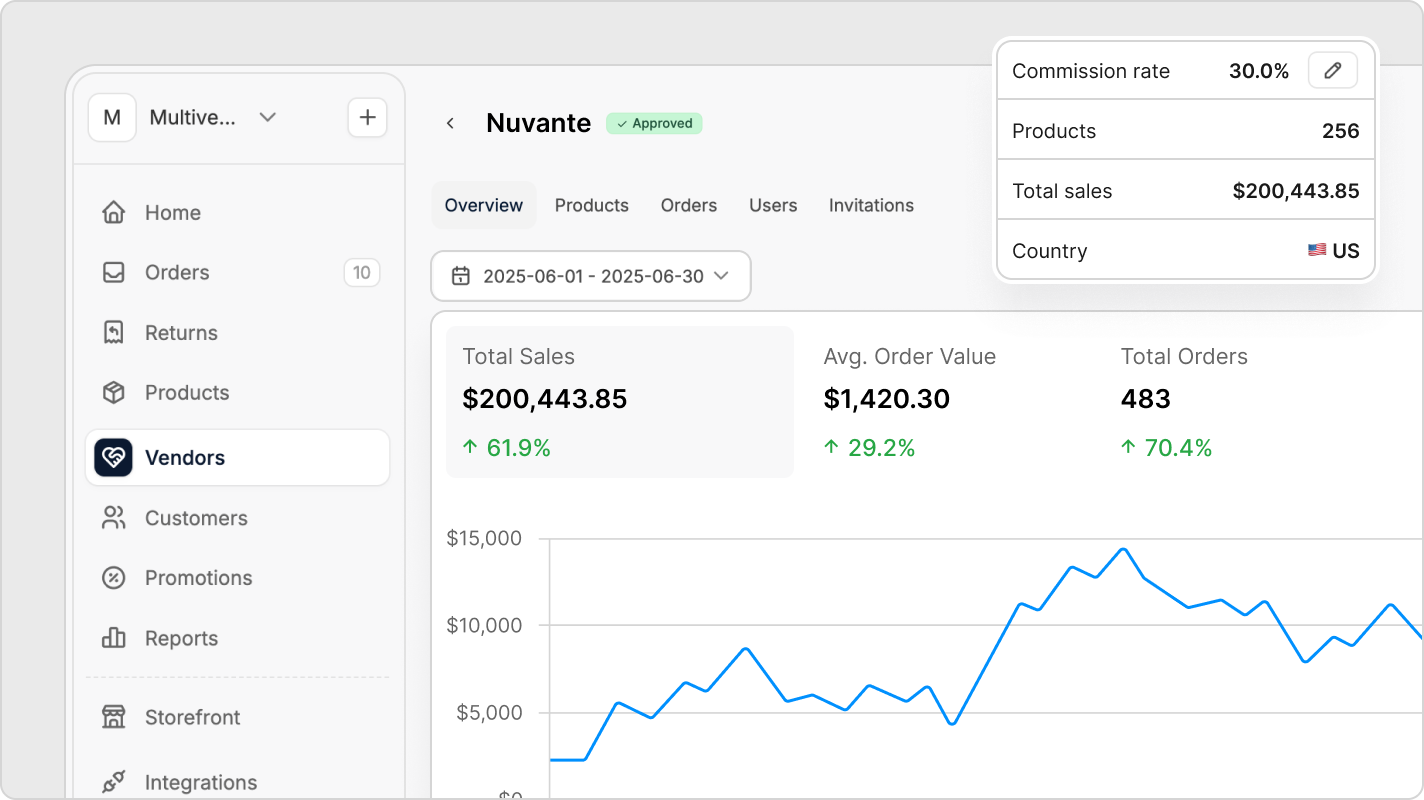 * **Marketplace Management** - invite vendors, approve or reject vendor signups, suspend accounts, and monitor vendor performance metrics.
* **Shopify Vendor Integration** - automate onboarding and operations for Shopify vendors using a white-labelled Shopify sales channel app
* **WooCommerce Vendor Integration** - automate onboarding and operations for WooCommerce vendors using a direct API integration
* **Manual or CSV Vendor Onboarding** - manually onboard vendors without an online store or using unsupported platforms via direct account setup in the vendor dashboard
* **Marketplace Merchandising** - ensure product consistency and branding integrity across all vendors
* **Promotions & Marketing Automations** - leverage marketing campaign tools for engagement and retention
* **Storefront & Content Management** - drag-and-drop layouts, modular pages, blog CMS, and newsletter tools.
* **Checkout & Payments** - support multi-vendor order splitting, quick checkout methods, tax calculation, and automated payouts via Stripe Connect.
* **Order Management** - order filtering, actions like cancellations or refunds, and tracking fulfillment per vendor.
* **Vendor Payouts** - automated or manual payouts with Stripe Connect, including KYC onboarding and vendor-accessible analytics.
* **Analytics & Reporting** - built-in KPIs, Google Analytics integration, and CSV exports for products and orders.
* **Customer Service** - optional chat and AI bots, ticketing, and store credits for efficient customer support.
* **APIs for headless projects and programmatic operations** - full coverage for storefront, platform, and checkout to enable custom functionality and integrations.
See [Marketplace Admin Panel](https://spreecommerce.org/docs/use-case/marketplace/admin-dashboard) for a more detailed breakdown.
### Vendor Capabilities
* **Marketplace Management** - invite vendors, approve or reject vendor signups, suspend accounts, and monitor vendor performance metrics.
* **Shopify Vendor Integration** - automate onboarding and operations for Shopify vendors using a white-labelled Shopify sales channel app
* **WooCommerce Vendor Integration** - automate onboarding and operations for WooCommerce vendors using a direct API integration
* **Manual or CSV Vendor Onboarding** - manually onboard vendors without an online store or using unsupported platforms via direct account setup in the vendor dashboard
* **Marketplace Merchandising** - ensure product consistency and branding integrity across all vendors
* **Promotions & Marketing Automations** - leverage marketing campaign tools for engagement and retention
* **Storefront & Content Management** - drag-and-drop layouts, modular pages, blog CMS, and newsletter tools.
* **Checkout & Payments** - support multi-vendor order splitting, quick checkout methods, tax calculation, and automated payouts via Stripe Connect.
* **Order Management** - order filtering, actions like cancellations or refunds, and tracking fulfillment per vendor.
* **Vendor Payouts** - automated or manual payouts with Stripe Connect, including KYC onboarding and vendor-accessible analytics.
* **Analytics & Reporting** - built-in KPIs, Google Analytics integration, and CSV exports for products and orders.
* **Customer Service** - optional chat and AI bots, ticketing, and store credits for efficient customer support.
* **APIs for headless projects and programmatic operations** - full coverage for storefront, platform, and checkout to enable custom functionality and integrations.
See [Marketplace Admin Panel](https://spreecommerce.org/docs/use-case/marketplace/admin-dashboard) for a more detailed breakdown.
### Vendor Capabilities
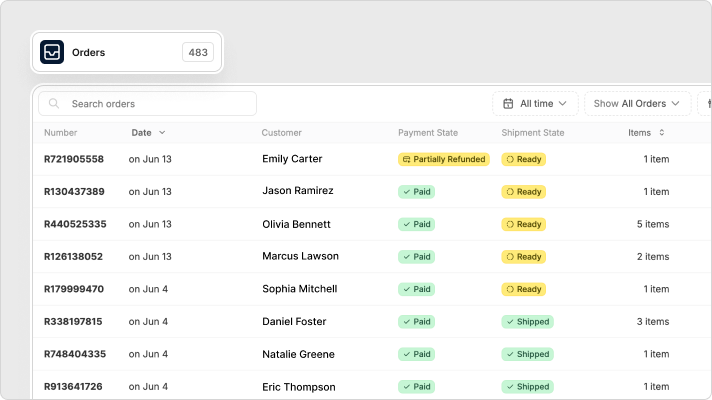 * **Vendor Dashboard** - onboard and manage products, orders, analytics, settings, and support from a dedicated dashboard.
* **Vendor Profile & Settings** - configure shipping, localization, and holiday mode to control store operations.
* **Manual or CSV-based Vendor Onboarding & Operations** - vendors can upload products, manage orders and shipments, and handle cancellations or refunds directly from their dashboard.
* **Automated Shopify Onboarding & Operations** - syncs products, orders, shipments, cancellations, and refunds automatically between Shopify and the marketplace.
* **Automated WooCommerce Onboarding & Operations** - syncs products, orders, shipments, cancellations, and refunds automatically between WooCommerce and the marketplace.
* **Vendor Payouts & Reporting** - automated or manual payouts, Stripe KYC onboarding, financial dashboards, and optional accounting integrations.
See [Marketplace Vendor Panel](https://spreecommerce.org/docs/use-case/marketplace/vendor-dashboard) for a more detailed breakdown.
### Customer Experience
* **Vendor Dashboard** - onboard and manage products, orders, analytics, settings, and support from a dedicated dashboard.
* **Vendor Profile & Settings** - configure shipping, localization, and holiday mode to control store operations.
* **Manual or CSV-based Vendor Onboarding & Operations** - vendors can upload products, manage orders and shipments, and handle cancellations or refunds directly from their dashboard.
* **Automated Shopify Onboarding & Operations** - syncs products, orders, shipments, cancellations, and refunds automatically between Shopify and the marketplace.
* **Automated WooCommerce Onboarding & Operations** - syncs products, orders, shipments, cancellations, and refunds automatically between WooCommerce and the marketplace.
* **Vendor Payouts & Reporting** - automated or manual payouts, Stripe KYC onboarding, financial dashboards, and optional accounting integrations.
See [Marketplace Vendor Panel](https://spreecommerce.org/docs/use-case/marketplace/vendor-dashboard) for a more detailed breakdown.
### Customer Experience
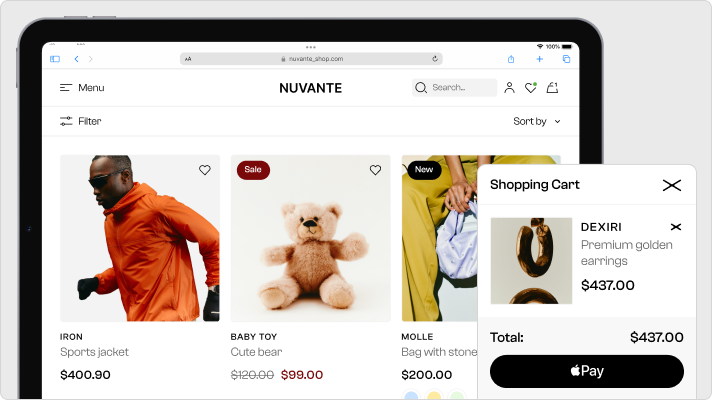 * **Multi-Vendor Shopping Experience** - multi-vendor cart and checkout, vendor-specific shipping, and a consistent storefront for products from multiple vendors.
* **Mobile-first UX** - responsive storefront design optimized for mobile, tablet, and desktop experiences.
* **Country-specific UX** - language and currency selectors with currency conversion at catalog and checkout level.
* **Marketplace Product Discovery** - shoppers can browse by brand or vendor and explore curated collections and categories.
* **Express Checkout & Payment Options** - including Apple Pay, Google Pay, installment plans
* **Notifications & Shipment Tracking** - send per-vendor email updates and provides a unified order view in the customer dashboard.
See [Marketplace Customer Experience](https://spreecommerce.org/docs/use-case/marketplace/customer-ux) for a more detailed breakdown.
## Marketplace Scenarios
Spree’s modular architecture supports a variety of advanced marketplace models beyond the standard vendor-customer setup, enabling tailored experiences for specific business needs:
* **B2B Marketplaces** - layer on custom pricing tiers, MOQs, tax exemptions, and quote workflows.
* **Subscription Marketplace Hybrid** - vendors offer recurring purchases, managed through Spree’s subscriptions engine.
* **Multi-region/Localized Marketplaces** - vendors can be grouped by country or region with localized catalogs, taxes, and shipping zones.
* **Headless Marketplace Frontend** - use Spree’s API to deliver a marketplace within a mobile app or a custom storefront built in Next.js, Vue, while leveraging the Spree marketplace backend functionality.
## Marketplaces Running on Spree
* [**Maisonette**](https://www.maisonette.com/) - a curated marketplace for premium children’s clothing, toys, and home goods, featuring independent brands and boutiques.
* [**Goop**](https://goop.com/) - lifestyle brand and wellness marketplace founded by Gwyneth Paltrow, combining content with commerce across beauty, fashion, and supplements.
* [**Artemest**](https://artemest.com/): a luxury marketplace showcasing handcrafted furniture, lighting, and decor by Italian artisans, blending editorial storytelling with ecommerce.
## Flexible, Customizable Architecture
While many marketplace features are available out-of-the-box in Spree Enterprise, the open-source foundation means you can extend and tailor the platform to your exact business model - whether that means custom commission logic, ERP integrations, or unique checkout flows.
Spree Enterprise offers flexibility across all layers of the platform, from code-level customization to no-code configuration.
## Full Ownership And Control
With Spree Enterprise, you’re not locked into a black-box SaaS model. You retain complete control over your infrastructure, data, and roadmap, enabling long-term flexibility, scalability, and compliance.
* **API-Driven Extensibility**
* **Full API Coverage** - extend the platform via REST or GraphQL APIs for storefronts, checkout, vendor dashboards, or 3rd-party integrations. See: [API Reference](https://spreecommerce.org/docs/api-reference/introduction)
* **Custom Integrations** - seamlessly connect with ERPs, CRMs, payment providers, POS systems, or headless frontends.
* **Deployment Flexibility**
* **Self-Hosting Options** - deploy Spree anywhere; your cloud provider, on-premise, or in specific geographic regions. See: [Deployment Guide](https://spreecommerce.org/docs/developer/deployment/render)
* **Provider Agnostic** - run on AWS, GCP, Azure, or Render. Tailor infrastructure to budget, compliance, and performance needs.
* **Scalability & Performance**
* **Built for Scale** - Spree supports advanced architectures using load balancers, Redis caching, CDN layers (e.g., Cloudflare or Fastly).
* **High Availability** - avoid downtime during peak sales periods or global rollouts with scalable infrastructure.
* **Security Under Your Control**
* **Data Encryption** - Protect sensitive data in transit and at rest using standard encryption protocols.
* **Anti-DDoS & Rate Limiting** - configure your own network protections using preferred security services.
* **Vulnerability Management** - patch quickly, audit dependencies, and apply security policies with no vendor bottlenecks.
* **Compliance Ownership**
* **Full Compliance Control** - build to meet your exact regulatory requirements, whether WCAG, GDPR, HIPAA, or SOC2.
* **Data Sovereignty** - keep data within borders required by your industry or region.
## Further Reading
* [Multi-Vendor Marketplace Model](https://spreecommerce.org/docs/use-case/marketplace/model)
* [Developer Docs](https://spreecommerce.org/docs/developer/getting-started/quickstart)
* [User Docs](https://spreecommerce.org/docs/user/what-is-spree-commerce)
* [Ecommerce API docs](https://spreecommerce.org/docs/api-reference/introduction)
* [Integrations](https://spreecommerce.org/docs/integrations/integrations)
## Get Started
Schedule a demo to explore the platform and get your questions answered
See Enterprise pricing for your use case
* **Multi-Vendor Shopping Experience** - multi-vendor cart and checkout, vendor-specific shipping, and a consistent storefront for products from multiple vendors.
* **Mobile-first UX** - responsive storefront design optimized for mobile, tablet, and desktop experiences.
* **Country-specific UX** - language and currency selectors with currency conversion at catalog and checkout level.
* **Marketplace Product Discovery** - shoppers can browse by brand or vendor and explore curated collections and categories.
* **Express Checkout & Payment Options** - including Apple Pay, Google Pay, installment plans
* **Notifications & Shipment Tracking** - send per-vendor email updates and provides a unified order view in the customer dashboard.
See [Marketplace Customer Experience](https://spreecommerce.org/docs/use-case/marketplace/customer-ux) for a more detailed breakdown.
## Marketplace Scenarios
Spree’s modular architecture supports a variety of advanced marketplace models beyond the standard vendor-customer setup, enabling tailored experiences for specific business needs:
* **B2B Marketplaces** - layer on custom pricing tiers, MOQs, tax exemptions, and quote workflows.
* **Subscription Marketplace Hybrid** - vendors offer recurring purchases, managed through Spree’s subscriptions engine.
* **Multi-region/Localized Marketplaces** - vendors can be grouped by country or region with localized catalogs, taxes, and shipping zones.
* **Headless Marketplace Frontend** - use Spree’s API to deliver a marketplace within a mobile app or a custom storefront built in Next.js, Vue, while leveraging the Spree marketplace backend functionality.
## Marketplaces Running on Spree
* [**Maisonette**](https://www.maisonette.com/) - a curated marketplace for premium children’s clothing, toys, and home goods, featuring independent brands and boutiques.
* [**Goop**](https://goop.com/) - lifestyle brand and wellness marketplace founded by Gwyneth Paltrow, combining content with commerce across beauty, fashion, and supplements.
* [**Artemest**](https://artemest.com/): a luxury marketplace showcasing handcrafted furniture, lighting, and decor by Italian artisans, blending editorial storytelling with ecommerce.
## Flexible, Customizable Architecture
While many marketplace features are available out-of-the-box in Spree Enterprise, the open-source foundation means you can extend and tailor the platform to your exact business model - whether that means custom commission logic, ERP integrations, or unique checkout flows.
Spree Enterprise offers flexibility across all layers of the platform, from code-level customization to no-code configuration.
## Full Ownership And Control
With Spree Enterprise, you’re not locked into a black-box SaaS model. You retain complete control over your infrastructure, data, and roadmap, enabling long-term flexibility, scalability, and compliance.
* **API-Driven Extensibility**
* **Full API Coverage** - extend the platform via REST or GraphQL APIs for storefronts, checkout, vendor dashboards, or 3rd-party integrations. See: [API Reference](https://spreecommerce.org/docs/api-reference/introduction)
* **Custom Integrations** - seamlessly connect with ERPs, CRMs, payment providers, POS systems, or headless frontends.
* **Deployment Flexibility**
* **Self-Hosting Options** - deploy Spree anywhere; your cloud provider, on-premise, or in specific geographic regions. See: [Deployment Guide](https://spreecommerce.org/docs/developer/deployment/render)
* **Provider Agnostic** - run on AWS, GCP, Azure, or Render. Tailor infrastructure to budget, compliance, and performance needs.
* **Scalability & Performance**
* **Built for Scale** - Spree supports advanced architectures using load balancers, Redis caching, CDN layers (e.g., Cloudflare or Fastly).
* **High Availability** - avoid downtime during peak sales periods or global rollouts with scalable infrastructure.
* **Security Under Your Control**
* **Data Encryption** - Protect sensitive data in transit and at rest using standard encryption protocols.
* **Anti-DDoS & Rate Limiting** - configure your own network protections using preferred security services.
* **Vulnerability Management** - patch quickly, audit dependencies, and apply security policies with no vendor bottlenecks.
* **Compliance Ownership**
* **Full Compliance Control** - build to meet your exact regulatory requirements, whether WCAG, GDPR, HIPAA, or SOC2.
* **Data Sovereignty** - keep data within borders required by your industry or region.
## Further Reading
* [Multi-Vendor Marketplace Model](https://spreecommerce.org/docs/use-case/marketplace/model)
* [Developer Docs](https://spreecommerce.org/docs/developer/getting-started/quickstart)
* [User Docs](https://spreecommerce.org/docs/user/what-is-spree-commerce)
* [Ecommerce API docs](https://spreecommerce.org/docs/api-reference/introduction)
* [Integrations](https://spreecommerce.org/docs/integrations/integrations)
## Get Started
Schedule a demo to explore the platform and get your questions answered
See Enterprise pricing for your use case