> ## Documentation Index
> Fetch the complete documentation index at: https://spreecommerce.org/docs/llms.txt
> Use this file to discover all available pages before exploring further.
# Sections
> Build Spree Rails Storefront pages with layout and content sections, including ActiveRecord models, theme views, and Page Builder admin forms.
## Quick Start
Sections are the building blocks of all pages in Spree Storefront.
There are two types of sections:
* eg. Header, Footer
* Present on all pages
* eg. Hero, Featured Products
* Present on specific pages
* can be managed via the Page Builder
Let's take a look at the page structure of Spree Storefront:
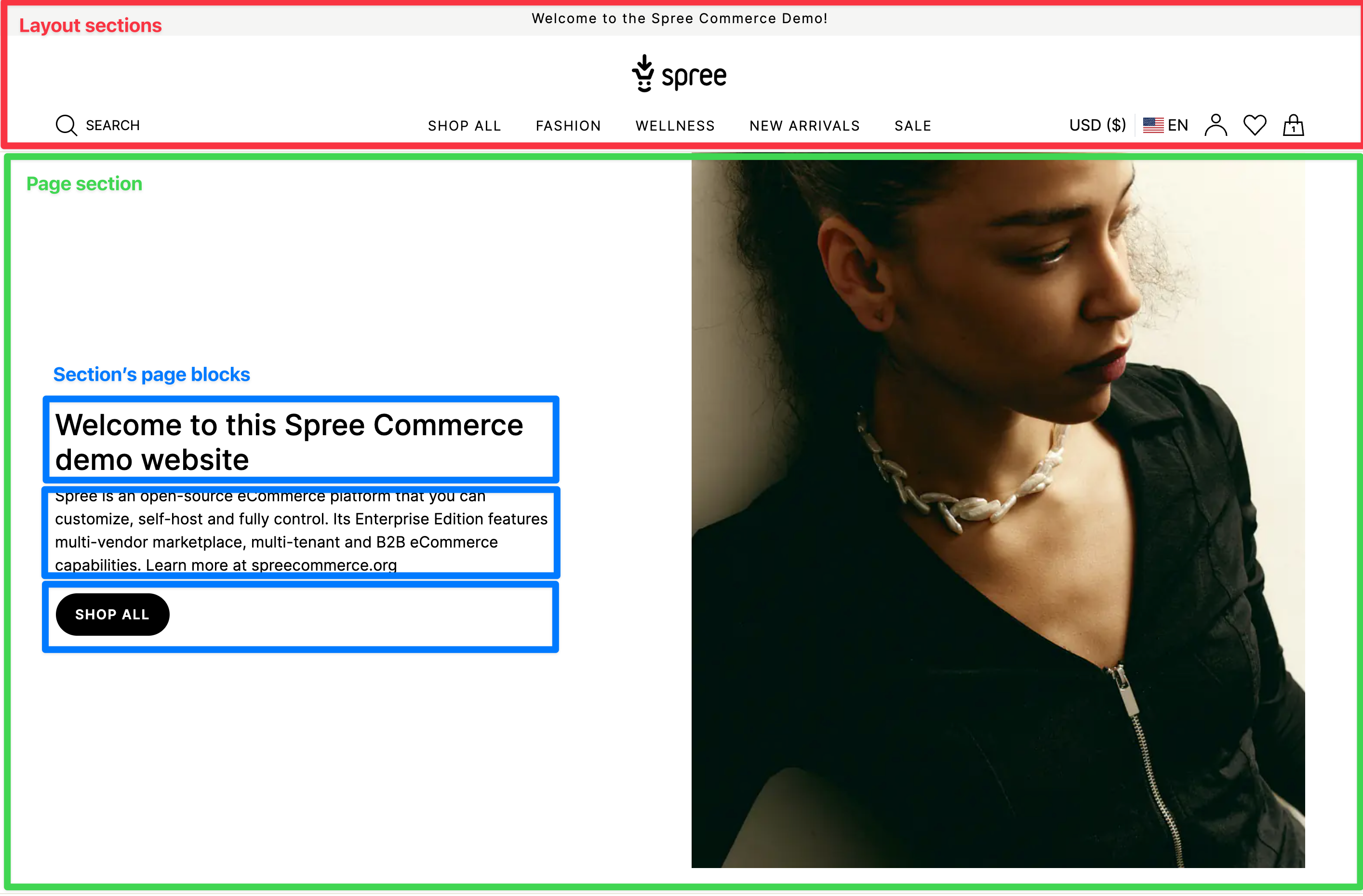 As you can see, the page is divided into sections. Each section is a component that is used to create the page.
Most sections are containers that consist of multiple blocks which you can manage via the Page Builder (add/customize/remove/change their order).
Each section consists of:
| File | Description | Example |
| ----------------------- | ------------------------------------------------------------------------ | -------------------------------------------------------------------------------------------------------------------------------------------------------- |
| ActiveRecord model | Defines the section's preferences | [Spree::PageSections::ImageWithText](https://github.com/spree/spree/blob/main/core/app/models/spree/page_sections/image_with_text.rb) |
| Storefront view | Renders the section in the storefront - each theme can have its own view | [image\_with\_text.html.erb](https://github.com/spree/spree/blob/main/storefront/app/views/themes/default/spree/page_sections/_image_with_text.html.erb) |
| Admin page builder form | Configures the section in the admin panel | [image\_with\_text/\_form.html.erb](https://github.com/spree/spree/blob/main/admin/app/views/spree/admin/page_sections/forms/_image_with_text.html.erb) |
## Layout Sections
We have two types of layout sections - Header and Footer. As the name suggests, they are rendered at the top and bottom of the page respectively. Between them, we have a main content area that is used to render the page sections.
### Header sections
#### Announcement Bar
As you can see, the page is divided into sections. Each section is a component that is used to create the page.
Most sections are containers that consist of multiple blocks which you can manage via the Page Builder (add/customize/remove/change their order).
Each section consists of:
| File | Description | Example |
| ----------------------- | ------------------------------------------------------------------------ | -------------------------------------------------------------------------------------------------------------------------------------------------------- |
| ActiveRecord model | Defines the section's preferences | [Spree::PageSections::ImageWithText](https://github.com/spree/spree/blob/main/core/app/models/spree/page_sections/image_with_text.rb) |
| Storefront view | Renders the section in the storefront - each theme can have its own view | [image\_with\_text.html.erb](https://github.com/spree/spree/blob/main/storefront/app/views/themes/default/spree/page_sections/_image_with_text.html.erb) |
| Admin page builder form | Configures the section in the admin panel | [image\_with\_text/\_form.html.erb](https://github.com/spree/spree/blob/main/admin/app/views/spree/admin/page_sections/forms/_image_with_text.html.erb) |
## Layout Sections
We have two types of layout sections - Header and Footer. As the name suggests, they are rendered at the top and bottom of the page respectively. Between them, we have a main content area that is used to render the page sections.
### Header sections
#### Announcement Bar
 A simple announcement bar section that displays a message to the users.
* [Announcement Bar model](https://github.com/spree/spree/blob/main/core/app/models/spree/page_sections/announcement_bar.rb)
* [Announcement Bar view](https://github.com/spree/spree/blob/main/storefront/app/views/themes/default/spree/page_sections/_announcement_bar.html.erb)
* [Announcement Bar form](https://github.com/spree/spree/blob/main/admin/app/views/spree/admin/page_sections/forms/_announcement_bar.html.erb)
#### Header
A simple announcement bar section that displays a message to the users.
* [Announcement Bar model](https://github.com/spree/spree/blob/main/core/app/models/spree/page_sections/announcement_bar.rb)
* [Announcement Bar view](https://github.com/spree/spree/blob/main/storefront/app/views/themes/default/spree/page_sections/_announcement_bar.html.erb)
* [Announcement Bar form](https://github.com/spree/spree/blob/main/admin/app/views/spree/admin/page_sections/forms/_announcement_bar.html.erb)
#### Header
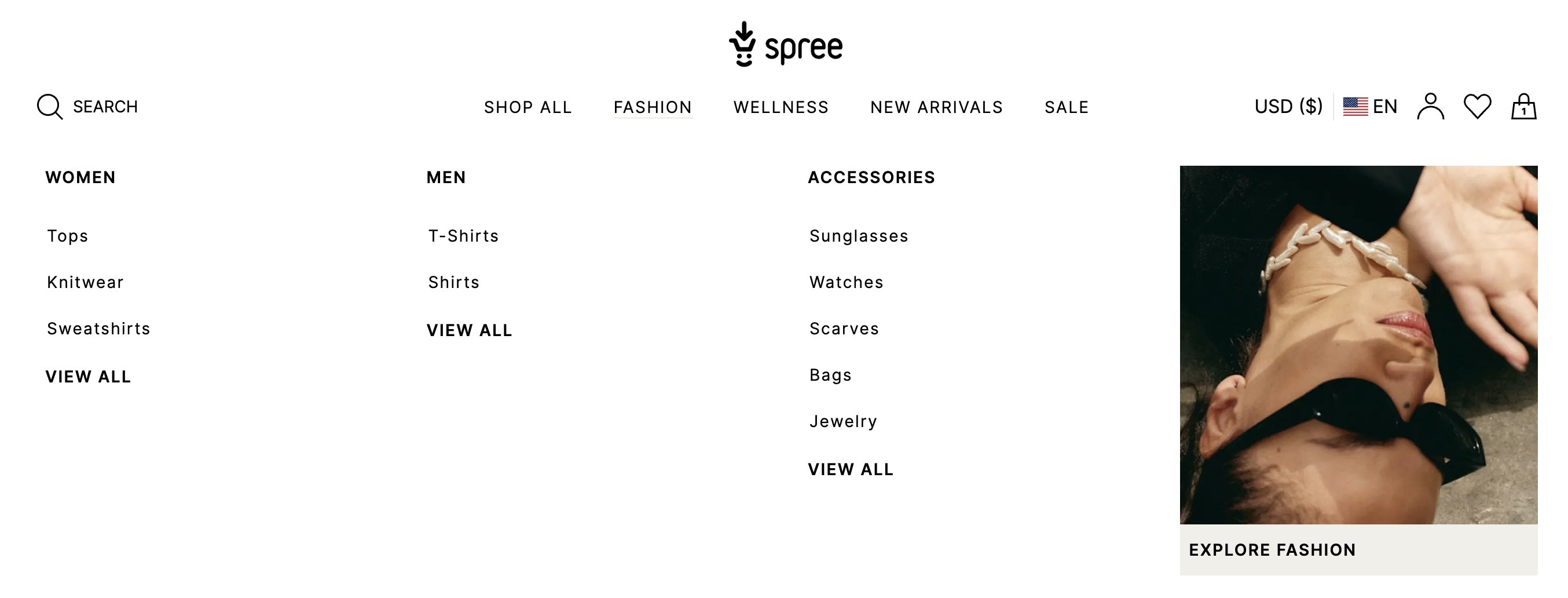 Header is one of the most important sections in the storefront. It is used to display the store's logo, navigation menu, search bar, cart icon, and user menu.
Header can have a simple one-level navigation menu or a more complex multi-level menu (aka mega menu)
* [Header model](https://github.com/spree/spree/blob/main/core/app/models/spree/page_sections/header.rb)
* [Header view](https://github.com/spree/spree/blob/main/storefront/app/views/themes/default/spree/page_sections/_header.html.erb)
* [Header form](https://github.com/spree/spree/blob/main/admin/app/views/spree/admin/page_sections/forms/_header.html.erb)
### Footer sections
#### Newsletter
Header is one of the most important sections in the storefront. It is used to display the store's logo, navigation menu, search bar, cart icon, and user menu.
Header can have a simple one-level navigation menu or a more complex multi-level menu (aka mega menu)
* [Header model](https://github.com/spree/spree/blob/main/core/app/models/spree/page_sections/header.rb)
* [Header view](https://github.com/spree/spree/blob/main/storefront/app/views/themes/default/spree/page_sections/_header.html.erb)
* [Header form](https://github.com/spree/spree/blob/main/admin/app/views/spree/admin/page_sections/forms/_header.html.erb)
### Footer sections
#### Newsletter
 A newsletter section that allows users to subscribe to the store's newsletter. If you connected your store to a newsletter provider (eg. Klaviyo, Mailchimp, etc.), you can use this section to collect emails and send them to your provider (Only in Spree 5.1+).
* [Newsletter model](https://github.com/spree/spree/blob/main/core/app/models/spree/page_sections/newsletter.rb)
* [Newsletter view](https://github.com/spree/spree/blob/main/storefront/app/views/themes/default/spree/page_sections/_newsletter.html.erb)
* [Newsletter form](https://github.com/spree/spree/blob/main/admin/app/views/spree/admin/page_sections/forms/_newsletter.html.erb)
#### Footer
A newsletter section that allows users to subscribe to the store's newsletter. If you connected your store to a newsletter provider (eg. Klaviyo, Mailchimp, etc.), you can use this section to collect emails and send them to your provider (Only in Spree 5.1+).
* [Newsletter model](https://github.com/spree/spree/blob/main/core/app/models/spree/page_sections/newsletter.rb)
* [Newsletter view](https://github.com/spree/spree/blob/main/storefront/app/views/themes/default/spree/page_sections/_newsletter.html.erb)
* [Newsletter form](https://github.com/spree/spree/blob/main/admin/app/views/spree/admin/page_sections/forms/_newsletter.html.erb)
#### Footer
 Footer is a section that is used to display the store's footer. It is typically used to display the store's logo, copyright information, store policies, and other important links.
* [Footer model](https://github.com/spree/spree/blob/main/core/app/models/spree/page_sections/footer.rb)
* [Footer view](https://github.com/spree/spree/blob/main/storefront/app/views/themes/default/spree/page_sections/_footer.html.erb)
* [Footer form](https://github.com/spree/spree/blob/main/admin/app/views/spree/admin/page_sections/forms/_footer.html.erb)
## Content Sections
Documentation on content sections is coming soon
## Architecture
Let's dive into the details of how sections work.
### Active Record Model
Each section's model inherit from [Spree::PageSection](https://github.com/spree/spree/blob/main/core/app/models/spree/page_section.rb) abstract model class.
#### Associations
Each sections has many blocks and links. You can call them via `section.blocks` and `section.links` respectively.
Section belongs to a polymorphic parent model called `pageable` which can be either `Spree::Page` (content sections) or `Spree::Theme` (layout sections).
You can access section's theme by calling `section.theme`.
#### Preferences
Each section has set of default [preferences](/developer/customization/model-preferences)
| Name | Description | Default Value |
| --------------------- | ----------------------------------------------- | ------------------------------------- |
| `text_color` | Color of text in the section | `nil` - uses theme's text color |
| `background_color` | Background color of the section | `nil` - uses theme's background color |
| `border_color` | Color of section borders | `nil` - uses theme's border color |
| `top_padding` | Padding space above section content (in pixels) | `40` |
| `bottom_padding` | Padding space below section content (in pixels) | `40` |
| `top_border_width` | Width of top border (in pixels) | `1` |
| `bottom_border_width` | Width of bottom border (in pixels) | `0` |
Particular sections can introduce their own preferences. For example, `Spree::PageSections::ImageWithText` has `desktop_image_alignment` and `vertical_alignment` preferences.
## Creating a New Section
This guide walks you through creating a custom section for your Spree storefront. We'll create a "Testimonials" section that displays customer reviews.
### Step 1: Create the Model
Create your section model that inherits from `Spree::PageSection`. Place it in `app/models/spree/page_sections/`:
```ruby app/models/spree/page_sections/testimonials.rb theme={"theme":"night-owl"}
module Spree
module PageSections
class Testimonials < Spree::PageSection
# Override default padding if needed
TOP_PADDING_DEFAULT = 60
BOTTOM_PADDING_DEFAULT = 60
# Define section-specific preferences
preference :heading, :string, default: 'What Our Customers Say'
preference :heading_size, :string, default: 'large'
preference :heading_alignment, :string, default: 'center'
preference :max_testimonials, :integer, default: 3
preference :show_rating, :boolean, default: true
# Validation for preferences
before_validation :ensure_valid_heading_size
before_validation :ensure_valid_alignment
# Icon displayed in the Page Builder sidebar
def icon_name
'quote'
end
# Define default blocks that are created with this section
def default_blocks
@default_blocks.presence || [
Spree::PageBlocks::Heading.new(
text: preferred_heading,
preferred_text_alignment: preferred_heading_alignment
)
]
end
# Which block types can be added to this section
def available_blocks_to_add
[
Spree::PageBlocks::Heading,
Spree::PageBlocks::Text
]
end
# Enable block management in admin
def blocks_available?
true
end
# Allow reordering blocks
def can_sort_blocks?
true
end
private
def ensure_valid_heading_size
self.preferred_heading_size = 'medium' unless %w[small medium large].include?(preferred_heading_size)
end
def ensure_valid_alignment
self.preferred_heading_alignment = 'center' unless %w[left center right].include?(preferred_heading_alignment)
end
end
end
end
```
### Step 2: Register the Section
Add your section to `Spree.page_builder.page_sections` in your Spree initializer:
```ruby config/initializers/spree.rb theme={"theme":"night-owl"}
Rails.application.config.after_initialize do
Spree.page_builder.page_sections += [
Spree::PageSections::Testimonials
]
end
```
Sections are filtered by their `role` method. By default, sections have role `'content'` which makes them available in the Page Builder. Sections with role `'header'` or `'footer'` are layout sections.
### Step 3: Create the Admin Form
Create the admin form partial for configuring the section in the Page Builder. Place it in `app/views/spree/admin/page_sections/forms/`:
```erb app/views/spree/admin/page_sections/forms/_testimonials.html.erb theme={"theme":"night-owl"}
Footer is a section that is used to display the store's footer. It is typically used to display the store's logo, copyright information, store policies, and other important links.
* [Footer model](https://github.com/spree/spree/blob/main/core/app/models/spree/page_sections/footer.rb)
* [Footer view](https://github.com/spree/spree/blob/main/storefront/app/views/themes/default/spree/page_sections/_footer.html.erb)
* [Footer form](https://github.com/spree/spree/blob/main/admin/app/views/spree/admin/page_sections/forms/_footer.html.erb)
## Content Sections
Documentation on content sections is coming soon
## Architecture
Let's dive into the details of how sections work.
### Active Record Model
Each section's model inherit from [Spree::PageSection](https://github.com/spree/spree/blob/main/core/app/models/spree/page_section.rb) abstract model class.
#### Associations
Each sections has many blocks and links. You can call them via `section.blocks` and `section.links` respectively.
Section belongs to a polymorphic parent model called `pageable` which can be either `Spree::Page` (content sections) or `Spree::Theme` (layout sections).
You can access section's theme by calling `section.theme`.
#### Preferences
Each section has set of default [preferences](/developer/customization/model-preferences)
| Name | Description | Default Value |
| --------------------- | ----------------------------------------------- | ------------------------------------- |
| `text_color` | Color of text in the section | `nil` - uses theme's text color |
| `background_color` | Background color of the section | `nil` - uses theme's background color |
| `border_color` | Color of section borders | `nil` - uses theme's border color |
| `top_padding` | Padding space above section content (in pixels) | `40` |
| `bottom_padding` | Padding space below section content (in pixels) | `40` |
| `top_border_width` | Width of top border (in pixels) | `1` |
| `bottom_border_width` | Width of bottom border (in pixels) | `0` |
Particular sections can introduce their own preferences. For example, `Spree::PageSections::ImageWithText` has `desktop_image_alignment` and `vertical_alignment` preferences.
## Creating a New Section
This guide walks you through creating a custom section for your Spree storefront. We'll create a "Testimonials" section that displays customer reviews.
### Step 1: Create the Model
Create your section model that inherits from `Spree::PageSection`. Place it in `app/models/spree/page_sections/`:
```ruby app/models/spree/page_sections/testimonials.rb theme={"theme":"night-owl"}
module Spree
module PageSections
class Testimonials < Spree::PageSection
# Override default padding if needed
TOP_PADDING_DEFAULT = 60
BOTTOM_PADDING_DEFAULT = 60
# Define section-specific preferences
preference :heading, :string, default: 'What Our Customers Say'
preference :heading_size, :string, default: 'large'
preference :heading_alignment, :string, default: 'center'
preference :max_testimonials, :integer, default: 3
preference :show_rating, :boolean, default: true
# Validation for preferences
before_validation :ensure_valid_heading_size
before_validation :ensure_valid_alignment
# Icon displayed in the Page Builder sidebar
def icon_name
'quote'
end
# Define default blocks that are created with this section
def default_blocks
@default_blocks.presence || [
Spree::PageBlocks::Heading.new(
text: preferred_heading,
preferred_text_alignment: preferred_heading_alignment
)
]
end
# Which block types can be added to this section
def available_blocks_to_add
[
Spree::PageBlocks::Heading,
Spree::PageBlocks::Text
]
end
# Enable block management in admin
def blocks_available?
true
end
# Allow reordering blocks
def can_sort_blocks?
true
end
private
def ensure_valid_heading_size
self.preferred_heading_size = 'medium' unless %w[small medium large].include?(preferred_heading_size)
end
def ensure_valid_alignment
self.preferred_heading_alignment = 'center' unless %w[left center right].include?(preferred_heading_alignment)
end
end
end
end
```
### Step 2: Register the Section
Add your section to `Spree.page_builder.page_sections` in your Spree initializer:
```ruby config/initializers/spree.rb theme={"theme":"night-owl"}
Rails.application.config.after_initialize do
Spree.page_builder.page_sections += [
Spree::PageSections::Testimonials
]
end
```
Sections are filtered by their `role` method. By default, sections have role `'content'` which makes them available in the Page Builder. Sections with role `'header'` or `'footer'` are layout sections.
### Step 3: Create the Admin Form
Create the admin form partial for configuring the section in the Page Builder. Place it in `app/views/spree/admin/page_sections/forms/`:
```erb app/views/spree/admin/page_sections/forms/_testimonials.html.erb theme={"theme":"night-owl"}
<%= f.label :preferred_heading, Spree.t(:heading) %>
<%= f.text_field :preferred_heading,
class: 'form-control',
data: { action: 'auto-submit#submit' } %>
<%= f.label :preferred_heading_size, Spree.t(:heading_size) %>
<%= f.select :preferred_heading_size,
options_for_select([
[Spree.t(:small), 'small'],
[Spree.t(:medium), 'medium'],
[Spree.t(:large), 'large']
], @page_section.preferred_heading_size),
{},
{ class: 'custom-select', data: { action: 'auto-submit#submit' } } %>
<%= f.label :preferred_heading_alignment, Spree.t(:alignment) %>
<%= f.select :preferred_heading_alignment,
options_for_select([
[Spree.t(:left), 'left'],
[Spree.t(:center), 'center'],
[Spree.t(:right), 'right']
], @page_section.preferred_heading_alignment),
{},
{ class: 'custom-select', data: { action: 'auto-submit#submit' } } %>
<%= f.label :preferred_max_testimonials, Spree.t(:max_items) %>
<%= f.number_field :preferred_max_testimonials,
class: 'form-control',
min: 1,
max: 10,
data: { action: 'auto-submit#submit' } %>
<%= f.check_box :preferred_show_rating,
class: 'custom-control-input',
data: { action: 'auto-submit#submit' } %>
<%= f.label :preferred_show_rating, Spree.t(:show_rating), class: 'custom-control-label' %>
<%# Add design settings to the Design tab %>
<% content_for(:design_tab) do %>
<% end %>
```
The `data: { action: 'auto-submit#submit' }` attribute enables live preview in the Page Builder - changes are saved automatically as the user types.
### Step 4: Create the Storefront View
Create the storefront partial that renders the section. Place it in your theme's views directory:
```erb app/views/themes/default/spree/page_sections/_testimonials.html.erb theme={"theme":"night-owl"}
<% cache_unless page_builder_enabled?, spree_storefront_base_cache_scope.call(section) do %>
<%# Heading %>
<% if section.preferred_heading.present? %>
<%
heading_class = case section.preferred_heading_size
when 'small' then 'text-lg'
when 'medium' then 'text-xl lg:text-2xl'
when 'large' then 'text-2xl lg:text-3xl'
end
%>
<%= section.preferred_heading %>
<% end %>
<%# Render blocks %>
<% section.blocks.includes(:rich_text_text).each do |block| %>
<% case block.type %>
<% when 'Spree::PageBlocks::Heading' %>
>
<%= block.text %>
<% when 'Spree::PageBlocks::Text' %>
>
<%= block.text %>
<% end %>
<% end %>
<%# Your custom testimonials content %>
<%# Add your testimonials rendering logic here %>
<% end %>
```
### Section Roles
Sections have different roles that determine where they appear:
| Role | Description | Example |
| --------- | --------------------------------------------------- | ------------------------ |
| `content` | Available in Page Builder, can be added to any page | Rich Text, Image Banner |
| `system` | Core page functionality, usually not removable | Product Details, Cart |
| `header` | Header layout sections | Header, Announcement Bar |
| `footer` | Footer layout sections | Footer, Newsletter |
To set a section's role, override the `self.role` class method:
```ruby theme={"theme":"night-owl"}
def self.role
'content' # default
end
```
### Section with Image Upload
If your section needs an image, use the built-in `asset` attachment:
```ruby app/models/spree/page_sections/hero_banner.rb theme={"theme":"night-owl"}
module Spree
module PageSections
class HeroBanner < Spree::PageSection
include Spree::HasImageAltText
preference :image_alt, :string
def icon_name
'photo'
end
end
end
end
```
Admin form with image upload:
```erb app/views/spree/admin/page_sections/forms/_hero_banner.html.erb theme={"theme":"night-owl"}
<%= render 'spree/admin/shared/page_section_image', f: f %>
<%= f.label :preferred_image_alt, Spree.t(:alt_text) %>
<%= f.text_field :preferred_image_alt,
class: 'form-control',
data: { action: 'auto-submit#submit' } %>
```
Display in storefront:
```erb theme={"theme":"night-owl"}
<% if section.asset.attached? %>
<%= spree_image_tag section.asset,
width: 1200,
height: 600,
alt: section.image_alt,
class: 'w-full object-cover' %>
<% end %>
```
### Section with Links
To add clickable links to your section, include the `Spree::HasPageLinks` concern (included by default) and define links:
```ruby theme={"theme":"night-owl"}
module Spree
module PageSections
class PromoBanner < Spree::PageSection
has_one :link, ->(ps) { ps.links },
class_name: 'Spree::PageLink',
as: :parent,
dependent: :destroy,
inverse_of: :parent
accepts_nested_attributes_for :link
def default_links
@default_links.presence || [
Spree::PageLink.new(label: Spree.t(:shop_now))
]
end
end
end
end
```
### Lazy Loading Sections
For sections that load external data (products, taxons), implement lazy loading to improve page performance:
```ruby theme={"theme":"night-owl"}
def lazy?
!Rails.env.test?
end
def lazy_path(variables)
url_options = variables[:url_options] || {}
Spree::Core::Engine.routes.url_helpers.page_section_path(self, **url_options)
end
```
### Helper Methods
These helper methods are available in storefront section views:
| Helper | Description |
| --------------------------------------- | ------------------------------------------------------- |
| `section_styles(section)` | Returns inline CSS for section padding, colors, borders |
| `block_attributes(block)` | Returns data attributes for Page Builder editing |
| `page_builder_enabled?` | Returns true when in Page Builder preview mode |
| `spree_storefront_base_cache_scope` | Cache key scope for the section |
| `section_heading_styles(section)` | Returns inline CSS for heading text color |
| `page_builder_link_to(link, **options)` | Renders a link with Page Builder support |
### Adding Translations
Add translations for your section in your locale files:
```yaml config/locales/en.yml theme={"theme":"night-owl"}
en:
spree:
page_sections:
testimonials:
heading_default: "What Our Customers Say"
text_default: "Read reviews from our happy customers"
```
### Complete Example
Here's a complete example putting it all together - a "Brand Story" section:
```ruby app/models/spree/page_sections/brand_story.rb theme={"theme":"night-owl"}
module Spree
module PageSections
class BrandStory < Spree::PageSection
include Spree::HasImageAltText
TOP_PADDING_DEFAULT = 80
BOTTOM_PADDING_DEFAULT = 80
preference :image_position, :string, default: 'left'
preference :image_alt, :string
def icon_name
'building-store'
end
def default_blocks
[
Spree::PageBlocks::Heading.new(text: 'Our Story'),
Spree::PageBlocks::Text.new(text: 'Share your brand story here...')
]
end
def available_blocks_to_add
[Spree::PageBlocks::Heading, Spree::PageBlocks::Text, Spree::PageBlocks::Buttons]
end
def blocks_available?
true
end
def can_sort_blocks?
true
end
end
end
end
```
```ruby config/initializers/spree.rb theme={"theme":"night-owl"}
Rails.application.config.after_initialize do
Spree.page_builder.page_sections += [Spree::PageSections::BrandStory]
end
```
```erb app/views/spree/admin/page_sections/forms/_brand_story.html.erb theme={"theme":"night-owl"}
<%= render 'spree/admin/shared/page_section_image', f: f %>
<%= f.label :preferred_image_alt, Spree.t(:alt_text) %>
<%= f.text_field :preferred_image_alt,
class: 'form-control',
data: { action: 'auto-submit#submit' } %>
<% content_for(:design_tab) do %>
<%= f.label :preferred_image_position, Spree.t(:image_position) %>
<%= f.select :preferred_image_position,
options_for_select([['Left', 'left'], ['Right', 'right']], @page_section.preferred_image_position),
{},
{ class: 'custom-select', data: { action: 'auto-submit#submit' } } %>
<% end %>
```
```erb app/views/themes/default/spree/page_sections/_brand_story.html.erb theme={"theme":"night-owl"}
<% cache_unless page_builder_enabled?, spree_storefront_base_cache_scope.call(section) do %>
<% image_order = section.preferred_image_position == 'right' ? 'lg:order-2' : '' %>
<% if section.asset.attached? %>
<%= spree_image_tag section.asset,
width: 600,
height: 400,
alt: section.image_alt,
class: 'w-full rounded-lg' %>
<% end %>
<% section.blocks.each do |block| %>
<% case block.type %>
<% when 'Spree::PageBlocks::Heading' %>
>
<%= block.text %>
<% when 'Spree::PageBlocks::Text' %>
>
<%= block.text %>
<% when 'Spree::PageBlocks::Buttons' %>
>
<% if block.link %>
<%= page_builder_link_to block.link,
class: 'btn-primary',
target: (block.link.open_in_new_tab ? '_blank' : nil) %>
<% end %>
<% end %>
<% end %>
<% end %>
```